Agentic AI is Changing the Way QA Testing Happens
Full article
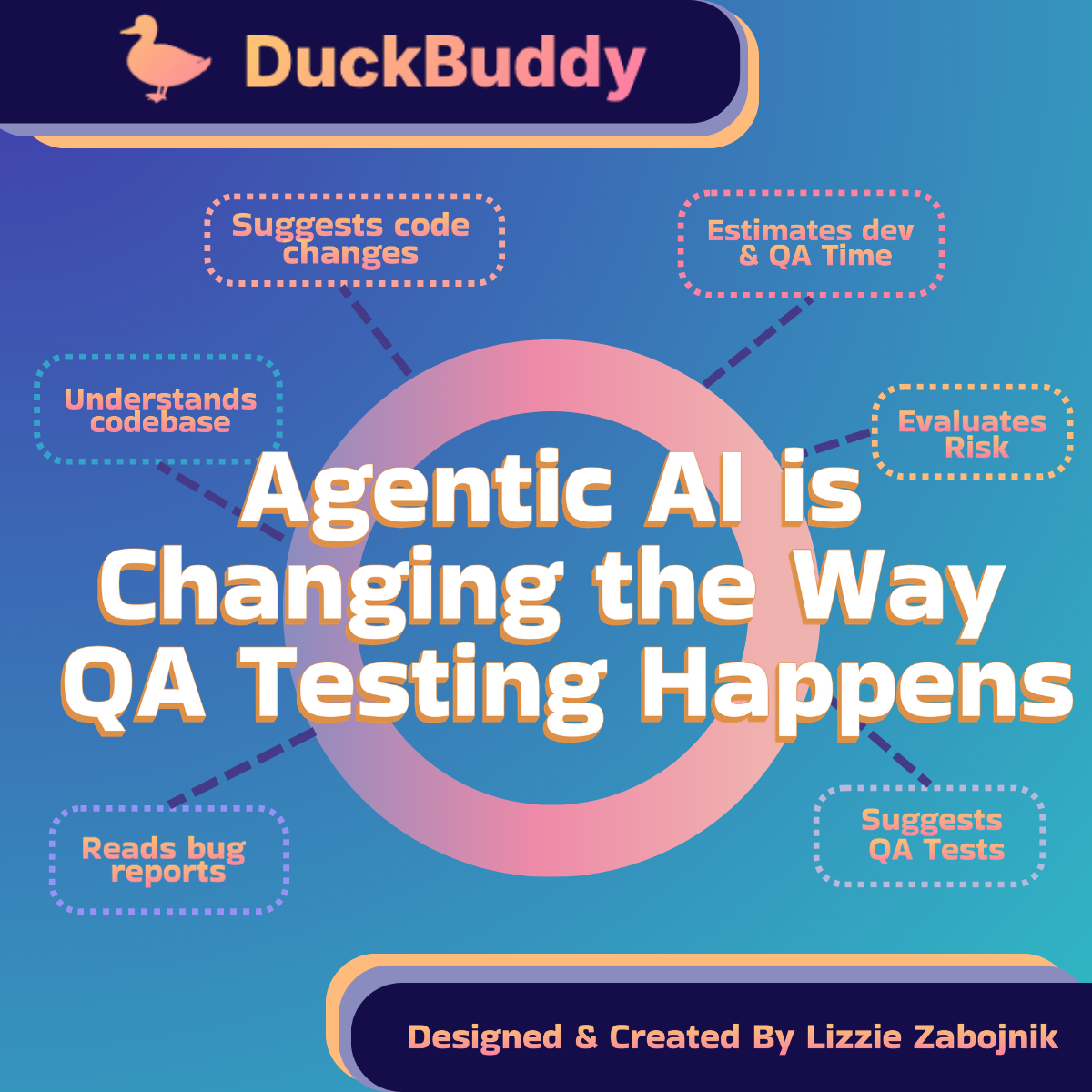
Agentic AI is smart, independent AI that can think, plan, and take action on its own. It is changing how quality assurance (QA) testing works in a big way. Instead of simple automated scripts that follow fixed steps for testing code changes for new features and bug fixes (which are popularly done in platforms like Playwright and Puppeteer), these AI agents act like helpful team members. They look at bug reports, your code, and project tools like Jira or Monday.com. They then figure out problems, suggest fixes, and provide QA test that are needed to validate the bug fixes before the modified code is deployed to production. This makes everything faster, with fewer mistakes and better software releases. Of course, for the best results, agents also need long, detailed, and specific guideline documents to reference each time they perform this work in order to perform the work safely and consistently. (Click here to learn more)
Reading Bug Reports from Customer Service
Many companies are connecting an agent to the platform that they use to track bug reports and new features such as Jira or Monday.com. When connected, the agent reads all the new bug reports and customer complaints. It pulls out important details such as how to repeat the problem, what the expected results are, and what's happening instead. A regular person might spend hours going through many tickets to find patterns or duplicates or discerning the true issue of a report bug. The AI does this in just minutes, even for hundreds of reports. Depending on how it's prompted and guided, it can quickly spot if the same issue has happened before and give a clear summary right away.
Example with DuckBuddy
- Imagine a developer working on DuckBuddy, a social media app that helps remote workers find others with similar personalities, jobs, interests, and projects in order to create community. A user reports: “The Save button on my profile doesn’t work when I try to change my profile picture. I pick a new photo, click Save, but nothing happens and I get an error.” The agent reads this Jira ticket, pulls the steps to repeat the bug, notes it happens on mobile and desktop, and links it to similar past image upload issues. It summarizes everything clearly for the developer in seconds.
Understanding the Code and Database
If the AI can see your source code or the database layout, it quickly reads and understands everything related to the bug. It checks every line of code, connections between parts, and how things are structured. A human developer often has to spend a lot of time re-reading code and jumping between files just to remember how a section works. The AI does all this in seconds or minutes. For example, it might say exactly which function or database table is causing the crash.
- In the DuckBuddy example, the agent searches the codebase and finds the React component for the profile page (ProfileEdit.jsx) that handles the Save button and image upload. It also locates the Python backend endpoint (/api/profile/update) and the SQL table (user_profiles) that stores profile pictures. It traces how the frontend sends the image to the backend and how the database gets updated.
Suggesting What Needs to Be Fixed
After figuring out the problem, the AI can be prompted to suggest clear ways to fix it. It can think through different options and pick good ones based on how the rest of the code looks. Before agentic AI assisting in this way, a developer would usually read the code, think of possible fixes, and try things out by hand. However, agents can read though every line of your code, dependencies, third party integration etc and then quickly create ready-to-use suggestions fast, often with explanations.
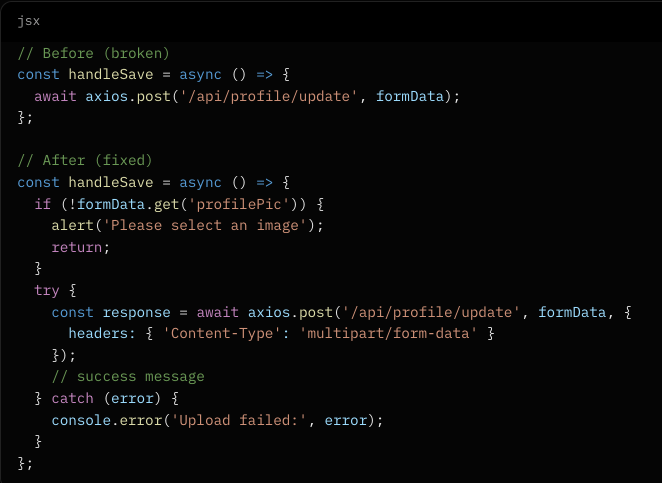
- For DuckBuddy, the agent discovers the bug is caused by a missing file type check in the JavaScript React frontend. It suggests a simple code change: adding proper error handling and a correct form data setup in the upload function. On the Python backend, it recommends a small fix to better handle the image file. The suggested code might look like this in React:
Estimating How Long the Fix Will Take
Agents can also be prompted to give a realistic guess on how much time the fix needs. It can look at how complex the code is, past work from your project tools, and similar fixes done before. People often guess based on experience and sometimes get it wrong because of hidden problems, personal bias, or personal experience based on their level of knowledge. The AI considers everything and says something like, “This is similar to a fix we did last month that took about 4 days.”
- For the DuckBuddy profile picture bug, the agent checks past similar image upload fixes and estimates: “This is a small-to-medium fix. It should take a developer about 3-5 hours, including testing.”
Checking How Risky the Change Is
Next, the agent can carefully check how “sensitive” a fix is — meaning how much it might affect other parts of the app, create security risks, or touch important connections. A person doing this on their own has to manually review many files and think about possible side effects, which can easily lead to gaps or issues in deployment where you say "well, we fixed it there but forgot to check the other part of the software it's related to over here". The AI measures the impact and suggests safer ways if needed, while taking into consideration all the areas of the code that need to be or will be affected by the code change.
- In the DuckBuddy case, the agent rates the fix as low sensitivity. It only touches the profile picture upload (a small part of the profile system), has no major security risks if the image size limit stays in place, and doesn’t affect matching algorithms or community features. It says the change has a small impact radius and is safe to deploy.
Suggesting the Right QA Tests
Agents can recommend the best tests to run after the fix when instructed to do so. This includes quick smoke tests (basic checks), sanity tests (quick verification), full functional tests, regression tests (to make sure nothing else broke), and end-to-end tests (complete user flows). Humans often make test plans from scratch or use standard ones from a Playwright library and might forget some important cases. The AI looks at the bug and past tests, then lists exactly what to check — saving time and making sure coverage is good.
For DuckBuddy, the agent suggests:
- Smoke test: Open profile, try uploading any image, and check if Save works.
- Functional test: Test different image formats (jpg, png), file sizes, and what happens with no image selected.
- Regression test: Make sure changing other profile fields (bio, interests) still works.
- End-to-end test: Full flow from picking a photo → saving → seeing the new picture in the community feed and matches.
Of Course The Human Check
Even though AI agents can effectively analyze bug reports, examine source code, suggest specific changes, provide time estimates (manual, agent-assisted, or fully agent-driven), and recommend QA tests, every output must still be carefully evaluated by a human. Agents can hallucinate facts, mix up context across different workflows or codebases, or make incorrect assumptions because they haven’t fully internalized your company’s unique architecture, conventions, or processes. Ultimately, the responsibility and accountability for the final work always fall on human shoulders — the agent is a powerful assistant, but not a replacement for human judgment, experience, and final approval. This human-in-the-loop approach ensures accuracy, quality, and alignment with business goals.
Remembering the Big Picture and Learning from the Past
These AI agents keep a very detailed memory of the whole software project. They quickly remember what fixed similar bugs before and what recent updates might have caused the new problem. A human might forget details from older work and have to search old records. The AI connects the dots fast and suggests better fixes that handle both old and new issues. It gets smarter over time as it sees more problems and solutions.
As it repeats this process and evaluates your codebase (or preferable a copy for safety reasons), it can more accurately report what the real issue is, where it is in the code, and propose a solution for a developer to review and implement (whether manually or by an agent).
Building on this, the agent can quickly and accurately suggest QA tests to validate the fix after the code changes have been implemented whether in a developer's local environment or the official QA environment.
In the end, agentic AI does not replace people in QA or development. It helps them by handling the boring, time-consuming parts so humans can focus on creative ideas, big decisions, and produce greater output for the company in general.
Teams using this AI can release software faster, with fewer bugs, and feel much more confident. As these smart agents get even better at working with code and project tools, they will become a normal and powerful part of building great software. Companies that start using them now will have a big advantage in the future.
*DuckBuddy is an online social networking platform concept that I created in order to have a concrete example of a company and company date in order to learn from. *