Why Does the World Have and Need API calls?
The Basics: How Data Is Transferred Across the Internet
Before we dive into API calls, let's establish the basics of how data is sent across the internet, because API's are part of that. Data moves across the internet through a layered stack of protocols (rules) and technologies (servers, computers, cables etc) that work together seamlessly.
- At the foundation, TCP/IP (Transmission Control Protocol / Internet Protocol) breaks data into packets (smaller pieces), routes them across networks using IP addresses, and ensures reliable delivery with TCP's error-checking and retransmission. TCP builds on top of IP to provide reliable, ordered, and error-checked delivery (it establishes connections, acknowledges receipt, and retransmits lost packets). Together, they ensure data gets where it needs to go reliably.
- UDP's (User Datagram Protocol) are faster but less reliable connectionless transmission for applications like streaming and gaming. It's a simpler, faster alternative to TCP. UDP sends data packets without establishing a connection, without guarantees of delivery, order, or error-checking. It's used when speed matters more than perfect reliability, such as in video streaming, online gaming, VoIP calls, and DNS queries.
- DNS (Domain Name System) The "phonebook of the internet." DNS translates human-readable domain names (like google.com) into machine-readable IP addresses (like 142.250.190.14) that computers use to locate servers. Without DNS, you'd have to remember numerical addresses for every website.
- HTTPS (HyperText Transfer Protocol Secure, HTTP secured with TLS) the secure version of HTTP, the protocol used for loading web pages and transferring data on the web. HTTPS adds encryption (via TLS/SSL) to protect data in transit from eavesdropping, tampering, or modification. It's what enables secure browsing, logins, and online transactions and provides the standard web communication protocol for requesting and transferring web pages, files, and resources securely with encryption.
- APIs (API stands for Application Programming Interface) such as RPC, SOAP, REST, and GraphQL, serve as structured interfaces built on top of these protocols—allowing different servers to talk to one another with the same software application and allow applications to make more efficient and specific programmatic requests (e.g., "fetch user data") between the front end and back end of a software application in order to receive faster and more tailored responses.
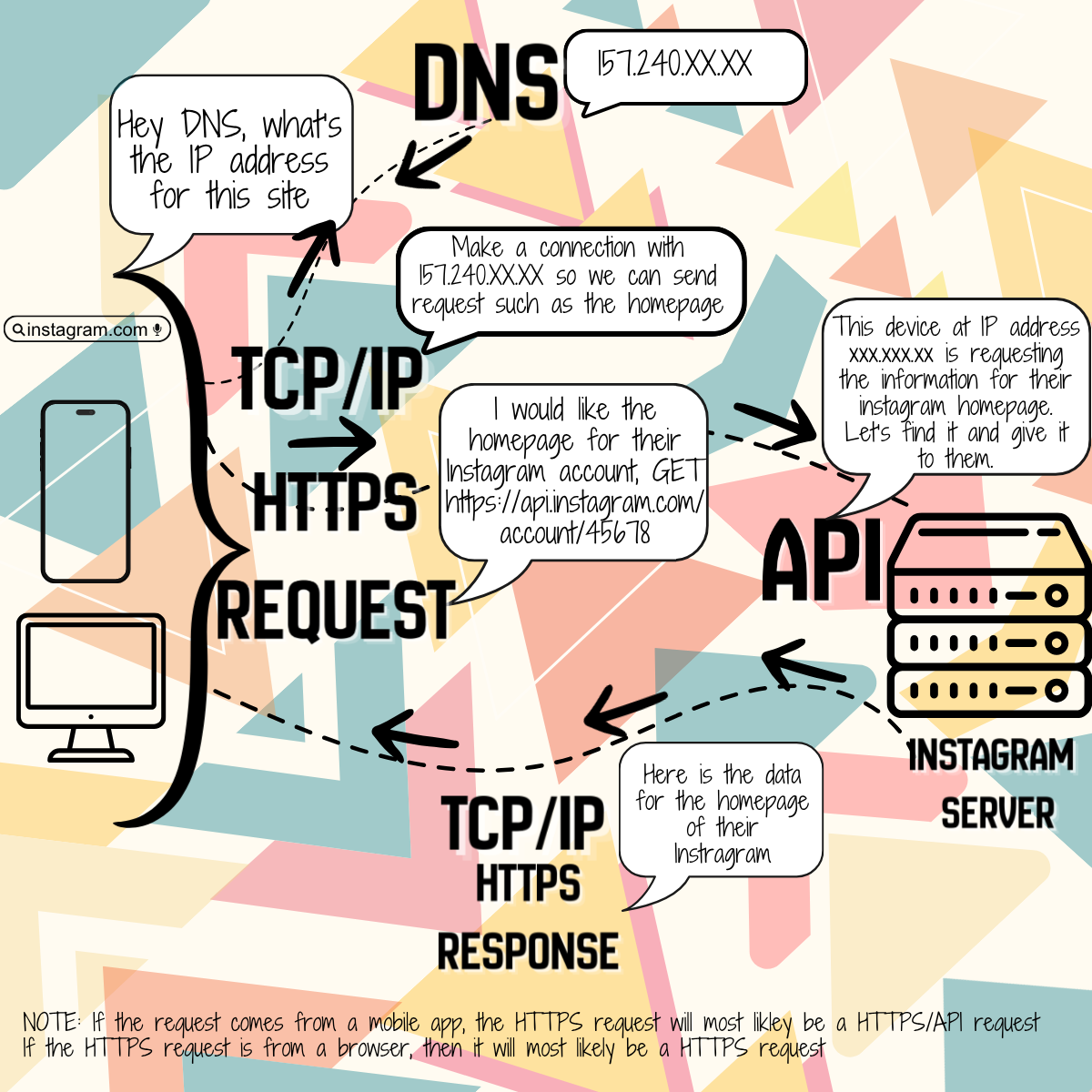
Here's a practical, step-by-step example of how all these technologies work together when you open a mobile app (like Instagram) and scroll through your feed:
- DNS: You type instagram.com or the app tries to connect automatically. Your device first asks a DNS server to translate the domain name instagram.com into the actual IP address of Instagram’s servers (e.g., 157.240.XX.XX).
- TCP/IP: Once the IP address is known, your device uses TCP/IP to establish a reliable connection. TCP creates a connection (the "handshake"), breaks your request into packets to route across the internet faster, and IP routes those packets across routers and networks around the world to reach Instagram’s physical servers.
- HTTPS: With the connection established, your app sends an HTTPS request to Instagram’s server asking for information regarding a certain page or post. This securely asks for data (e.g., “give me the user's homepage or the latest feed posts”). There are different HTTPS request that can request different information such as HTML for websites, downloading files, content in website such as pictures, and API calls for specific information or changes.
- Browsers (on both desktops and phones) make non-API HTTPS requests for HTML (HyperText Markup Language- standard code used to create and structure the content of a web page). However after the page loads, they make API requests behind the scenes (like loading more tweets or posts without refreshing the page) or when you make a change to your profile or add a product to your shopping cart.
- Apps on your phone don't need to request the data for entire webpages, just the parts that make the app work so they often use HTTPS/API requests.
- Non API Example: https://www.instagram.com/user/homepage
- API Example: https://api.shopfast.com/cart/add
- API: The Instagram server receives the HTTPS/API request (from your mobile app) through its API (a REST or GraphQL API endpoint- more on that later). The API processes the request on the server, authenticates you (who you are), fetches the relevant data from their databases, and prepares a response (usually in JSON format) containing your personalized homepage or feed to send back to your mobile app.
- TCP/IP (again): The server sends the response back using TCP/IP — packets (data broken up into smaller bits) are routed reliably across the internet to your device to them build the homepage or data feed in your app or web-browser.
- UDP (in supporting roles): While the main feed data uses TCP + HTTPS, other parts might use UDP — for example, live video stories, real-time notifications, or loading images/videos where speed is more important than perfect reliability.
Summary Flow:
DNS → finds the address number based on the website name you enter
TCP/IP → routes and reliably delivers the packets of data from the HTTPS requests
HTTPS → securely communicates the web request/response (what you are wanting to view or post)
API → provides the structured way the app and server actually understand each other (“get my feed”) so the company's server knows what to send back to you
UDP → handles speed-critical side tasks (e.g., media streaming)
This combination is how almost every modern app and website works behind the scenes. TCP/IP and DNS are the universal infrastructure, HTTPS is the secure web layer, APIs add the smart application logic to request specific data or data changes, and UDP provides fast alternatives where needed.
Before the Days of API Calls
A long time ago, most companies built their software like a big, single house — everything (user login, payments, product listings, emails, etc.) was inside one giant application.
But as companies grew bigger, this caused problems:
- The app became very slow and hard to fix — changing one small thing could break everything else.
- If one part crashed (like the payment system), the whole app went down.
- It was difficult to add new features quickly.
- Different teams kept stepping on each other’s toes while working in the same server.
In addition, in the late 90s, the web was incredibly clunky. If you wanted to check if you had a new message on a forum, or add an item to a shopping cart, you had to click a link and wait for the entire web page to reload. It was slow, drained bandwidth, and felt nothing like a smooth desktop application.
The Waves of Different API Calls That Changed Everything
Wave One: Server to Server
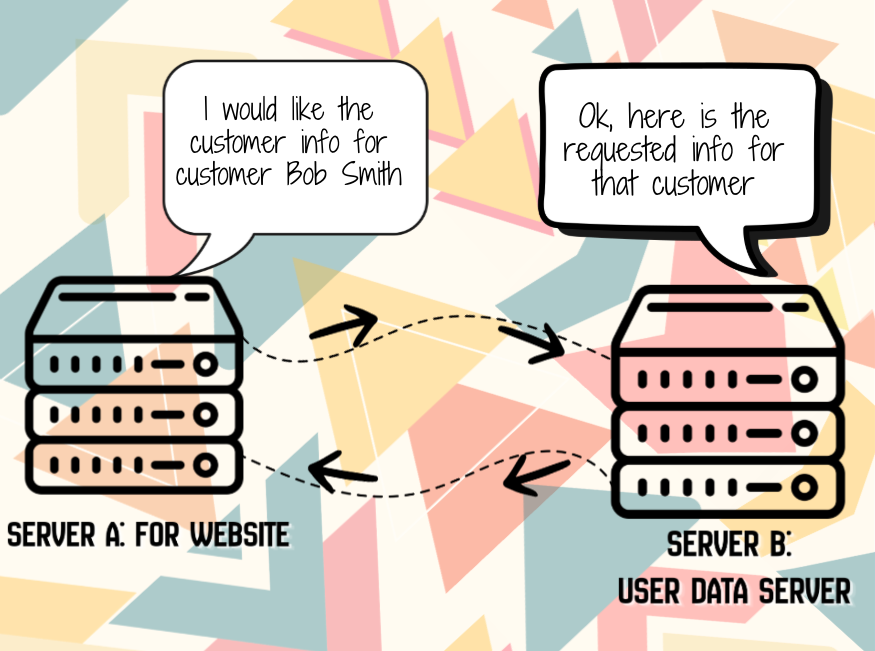
In the 1980s and 1990s as companies grew and their software become more complex, they started splitting up their software onto different servers. These different servers handled different parts of the software application—one handled for billing, another took care of customer management, another started to be used for inventory. Splitting software into different servers and components is the foundation of a microservice architecture. Rather than building one large, bundled application (a monolith), you break it into small, independent services that communicate with each other over a network using APIs.
Software applications that use this microservice architecture are often written in different programming languages. Using different software languages across different servers is called polyglot programming, and it is one of the biggest advantages of a microservice architecture. Instead of forcing a single language to do everything, you choose the absolute best tool for each specific job.
The Problem: When this happened, developers needed a standardized way for these different systems or servers to talk to each other over networks, to request information, to trigger actions, and to get results back so that all the parts of the software work together to give the end customer what they need when they ask for it.
The Solution: API calls, specifically Remote Procedure Call (RPC) protocols emerged in the 1980s, allowing one server to invoke functions (request data aka talk to) on another server across the network and deliver that data to the server requesting it. Basically, it allowed different machines to talk to each other over a network and ask other machines to get the data that it's in charge of housing and send it to the machine that is requesting it. It's like saying, “Hey other machine, run the ‘get my client list’ command and give me the info for my clients number 10506 - 12345.”
- XML-RPC: The API call consisted of a method (type of call) with parameters (filters for specific info).
-
<methodCall><methodName>getUser</methodName><params><param><value><int>123</int></value></param></params></methodCall>
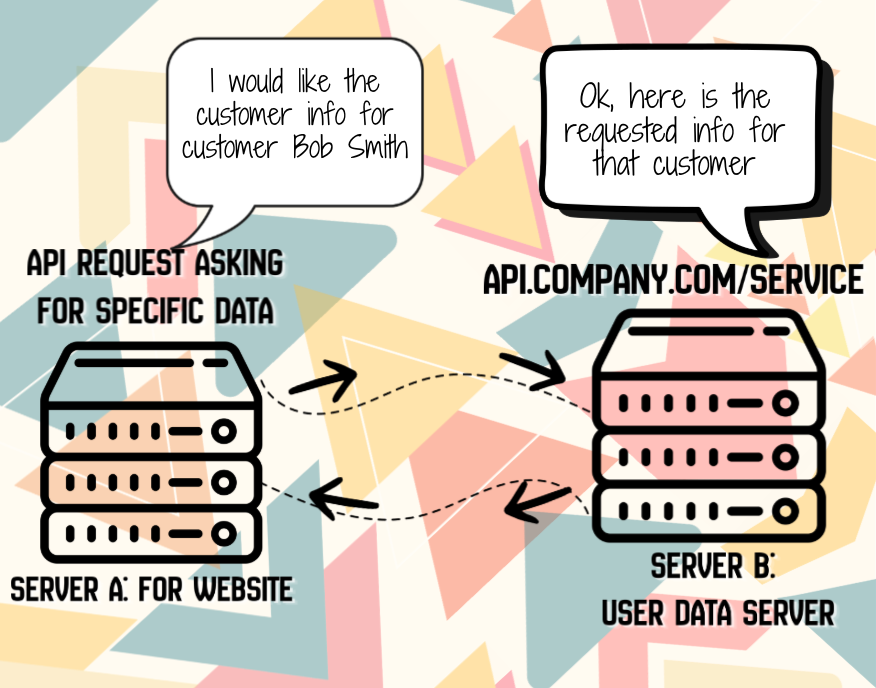
By the late 1990s and early 2000s, SOAP (Simple Object Access Protocol) became the standard. It was a more structured approach, built on XML (eXtensible Markup Language, which is a flexible, text-based format used to store, organize, and transport data). Microsoft led this effort, and it became the standard for enterprise applications. The idea was simple: all your API calls go through/get sent to ONE endpoint/URL (like api.company.com/service), and you specify what action you want in the message body. In simply terms, you write a very formal, detailed letter with strict rules and special formatting (lots of extra wrapping and official language) for the other machine/system to read. The other system reads the whole letter and sends back a long, official reply. It’s very proper and organized, but a bit old-fashioned and wordy.
- SOAP: The API call consisted of a method (type of call) with parameters (filters for specific info).
-
<soap:Envelope><soap:Body><GetCustomerInfo><CustomerID>12345</CustomerID></GetCustomerInfo></soap:Body></soap:Envelope>
Think of SOAP as the corporate world's first love—it was formal, structured, and came with lots of documentation (WSDL files that defined everything). Banks, government agencies, and large enterprises loved it because it had built-in security standards and was very explicit about what it expected.
Examples of others:
- CORBA: Used Interface Definition Language (IDL) to define methods that could be called remotely
- DCOM (Distributed Component Object Model): Microsoft's proprietary RPC system for Windows
How It Works
- All API calls from different servers went through ONE endpoint (like
api.company.com/service) - You specified what action you wanted in an XML message body, such as GetUsers
- The server accepting the API call would route your request to the appropriate function and return results to the other server
- Example: Imagine a company has:
- Server A: Accounting system (handles billing and invoices)
- Server A sends this XML message over HTTP to Server B's endpoint:
- When a customer places an order, the Accounting server needs to check if the customer has good credit before generating an invoice. Here's what happens:
- 1. The Accounting application on Server A constructs a SOAP XML (API Call) message:
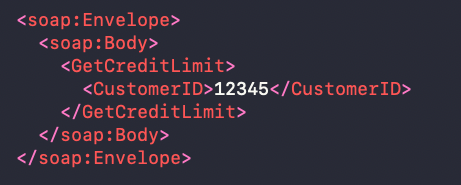
- 2. Server A sends this XML message over HTTP to Server B's endpoint: https://crm-server.company.com/service
- 3. The CRM application on Server B receives the request, looks up the customer's credit limit in its database, and sends back a response:
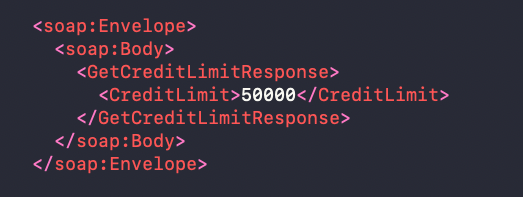
- 4. Server A receives the response and continues processing the order.
The API is the standardized way they communicate, even though they might run different operating systems, databases, or programming languages.
Why XML-RPC & SOAP API's Made Things Better:
- Companies could use best-of-breed systems for different functions
- Teams could work on different servers independently
- Legacy systems could integrate with new systems
- Businesses weren't locked into one vendor or technology
Wave Two: Browser-to-Server Communication
The second wave of API evolution happened when developers realized APIs could solve a completely different problem—making web pages less clunky and less slow.
The Problem: In the late 1990s, the web was painfully slow and inefficient. If you wanted to check if you had a new message on a forum, or add an item to a shopping cart, you had to click a link and wait for the entire web page to reload. Every action meant downloading the whole page again—HTML, CSS, images, everything. It was slow, wasted bandwidth, and felt nothing like a smooth desktop application.
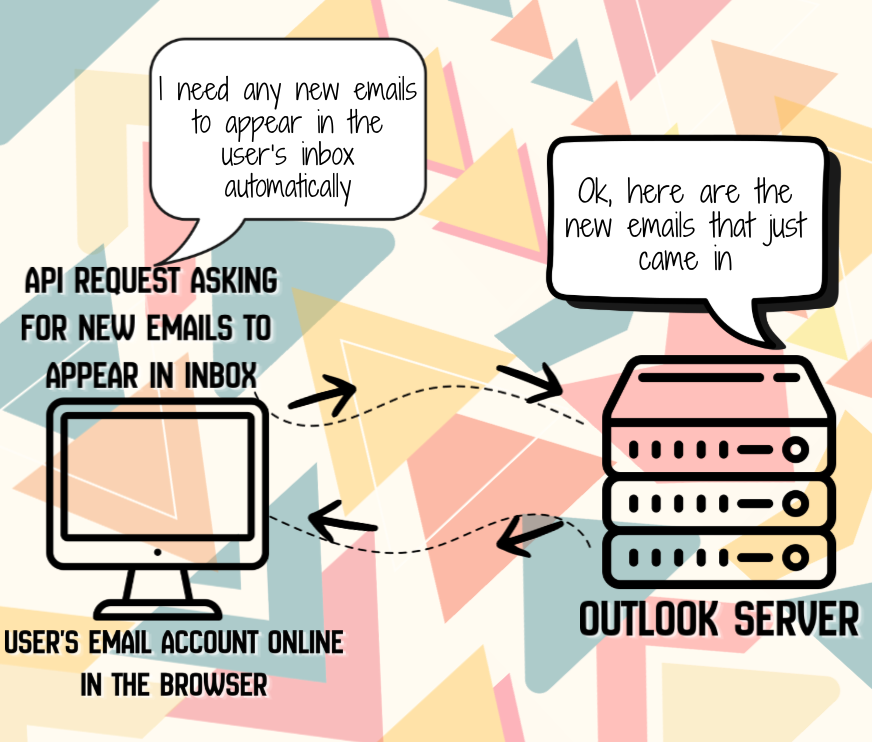
The Solution: In 1999, Microsoft invented not a new type of API but a new technique for using API calls called XMLHttpRequest for their web-based Outlook application. This new technique allowed it to check for new emails without refreshing the page. By 2005, this technique was dubbed AJAX (Asynchronous JavaScript and XML), and companies like Google (with Gmail and Google Maps) popularized it. AJAX can be used to request different types of data, just how HTTPS requests can request different types of data.
The AJAX technique can use REST, SOAP etc API's to GET, POST, etc.
- REST API - AJAX with XML: Browser requests
GET /api/messages?since=12345and receives<messages><message id="1">Hello</message></messages> - REST API - AJAX with JSON: Browser requests
GET /api/cartand receives{"items": [{"id": 5, "name": "Shirt", "price": 29.99}]} - REST API - Modern Fetch API (JavaScript interface used for making asynchronous HTTP network requests):
fetch('/api/users').then(response => response.json()) - XMLHttpRequest: The original browser API for making background requests before Modern Fetch API
How It Works
- The web browser (frontend) makes background API calls to the server (backend)
- Only the new data was fetched, not the entire page
- JavaScript updates just the parts of the page that changed
- Users got a smooth, app-like experience in their browser
Easy Example:
- Imagine you're on Facebook or Instagram:
- You scroll down and new posts appear automatically.
- You like a post and the counter updates instantly.
- You comment and it shows up right away.
All of this happens without the whole page refreshing or going blank. That’s AJAX working behind the scenes.
Why AJAX API's Made Things Better:
- Web pages became interactive and responsive
- Reduced server load (no need to send full pages for small updates)
- Saved bandwidth and made sites faster
- Enabled the Web 2.0 experience (think Facebook, Gmail, Google Maps)
- Made web apps feel like desktop applications
Wave 3: The REST Revolution
As mobile apps exploded and web applications became more complex, developers needed something simpler and more scalable than SOAP. In 2000, Roy Fielding wrote his doctoral dissertation introducing REST (Representational State Transfer).
The Problem with SOAP:
- Heavy XML messages were slow and bandwidth-intensive
- Complex specifications made it hard to learn and implement
- Not well-suited for mobile devices with limited bandwidth
- Overly rigid for simple web applications
The Solution: REST leveraged the existing web infrastructure (HTTP methods of GET, POST, PUT, PATCH, and DELETE, URLs, and status codes 200, 400, 404, 500 etc) to create a simpler, more intuitive API style.
How It Works
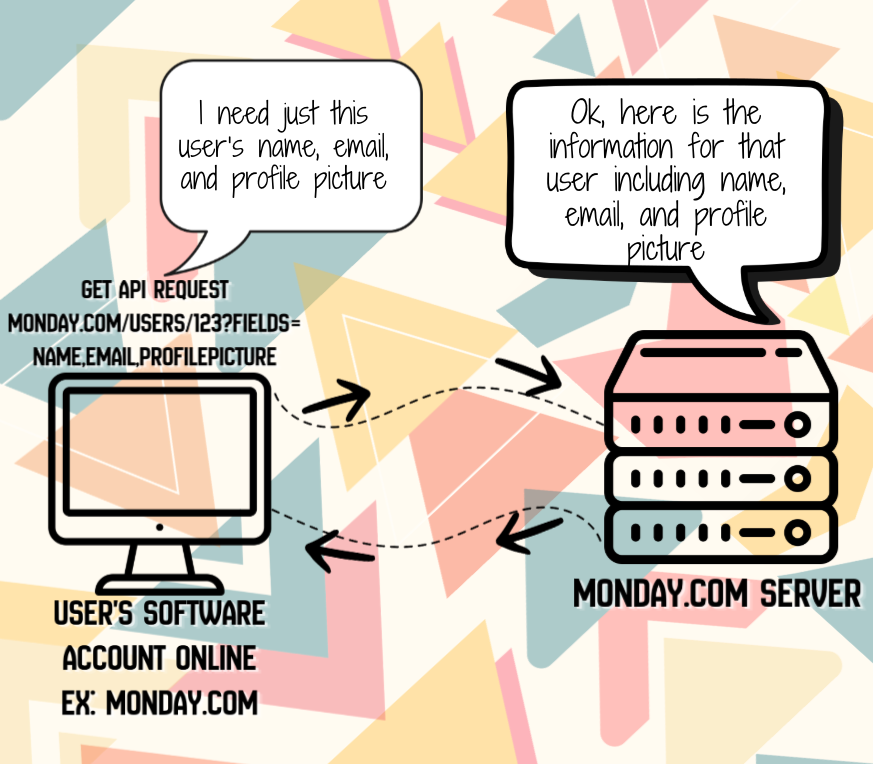
Instead of one endpoint/URL that all API calls are sent to, REST uses a different endpoint/URL for each resources:
/usersto get all user/productsfor products/ordersfor orders
With REST API calls you can also use queries to filter down to specific information, based on the queries that the developer of the API's allows.
/user/123?fields=name,email,profilepicturefor a specific user's name, email, and profile pictureproducts?category=books/693563for a specific book under productsproducts?category=books/ordersfor only book orders
Each resource uses standard HTTP methods:
- GET to retrieve
- POST to create
- PUT/PATCH to update
- DELETE to remove
- Also known as CRUD operations
Examples:
When you are in a software application and you click in the side menu bar to see the list of users and then click on a specific user, that click on the specific user initiates an API call from the browser to the software's server - GET https://api.example.com/users/123 . Once their server receives it and processes it, it returns user data as JSON and then displays it in the browser for you to view.
When you are purchasing a new product on a website, the API call is something like POST https://api.example.com/orders with body {"userId": 123, "productId": 456} for that specific product which sends that request to the software application's server in order to make the purchase happen.
When you add a new user to the software, the API call is something like PUT https://api.example.com/users/123 with body {"name": "John Doe"} which sends that request to the software application's server to add the user's name in the database.
When you click to delete an order from a website, the API call is something like DELETE https://api.example.com/orders/789 which send the request to the software application's server to delete the order.
Why REST API's Made Things Better:
- REST just uses standard URLs. You want a user? Go to /users/123. That’s it.
- By adopting JSON instead of XML, REST drastically reduced the size of API responses. JSON is faster to transmit over networks (saving mobile data) and much faster for browsers and apps to parse into usable objects.
- REST just uses standard HTTP. Developers already knew how to use GET, POST, PUT, and DELETE, and they already understood HTTP status codes like 200 OK, 404 Not Found, and 500 Server Error.
- REST is "stateless," meaning every single request contains all the information the server needs to fulfill it. The server doesn't have to remember previous requests. This makes it incredibly easy to scale up by just adding more servers behind a load balancer.
- When smartphones and Single Page Applications (SPAs) exploded in the 2010s, they needed fast, efficient ways to fetch data without reloading pages. REST’s lightweight JSON and simple HTTP calls were the perfect fit for this new era of computing.
Wave 4: Websockets and Webhooks
WebSockets: Real-Time Bidirectional Communication
As web applications became more interactive, HTTP's request-response model had limitations. Traditional HTTP required clients to constantly ask servers for updates, creating unnecessary traffic and delays. Chat applications, live dashboards, and collaborative tools needed a better way to push data instantly.
Back in 2008-2011, web developers were struggling with real-time features. Applications like chat rooms, stock tickers, and live notifications needed constant updates. With HTTP, developers had two bad options:
Short Polling: The client repeatedly calls GET /messages every 2 seconds to check for new messages. This created massive server load and wasted bandwidth with thousands of requests that returned "no new messages."
Long Polling: The client calls GET /messages and the server holds the connection open until new data is available. This reduced requests but still required reopening connections constantly, had timeout issues, and didn't scale well for thousands of concurrent users.
Neither option was good. Users wanted instant updates without draining battery or bandwidth, but HTTP's one-way communication model couldn't deliver true real-time experiences efficiently.
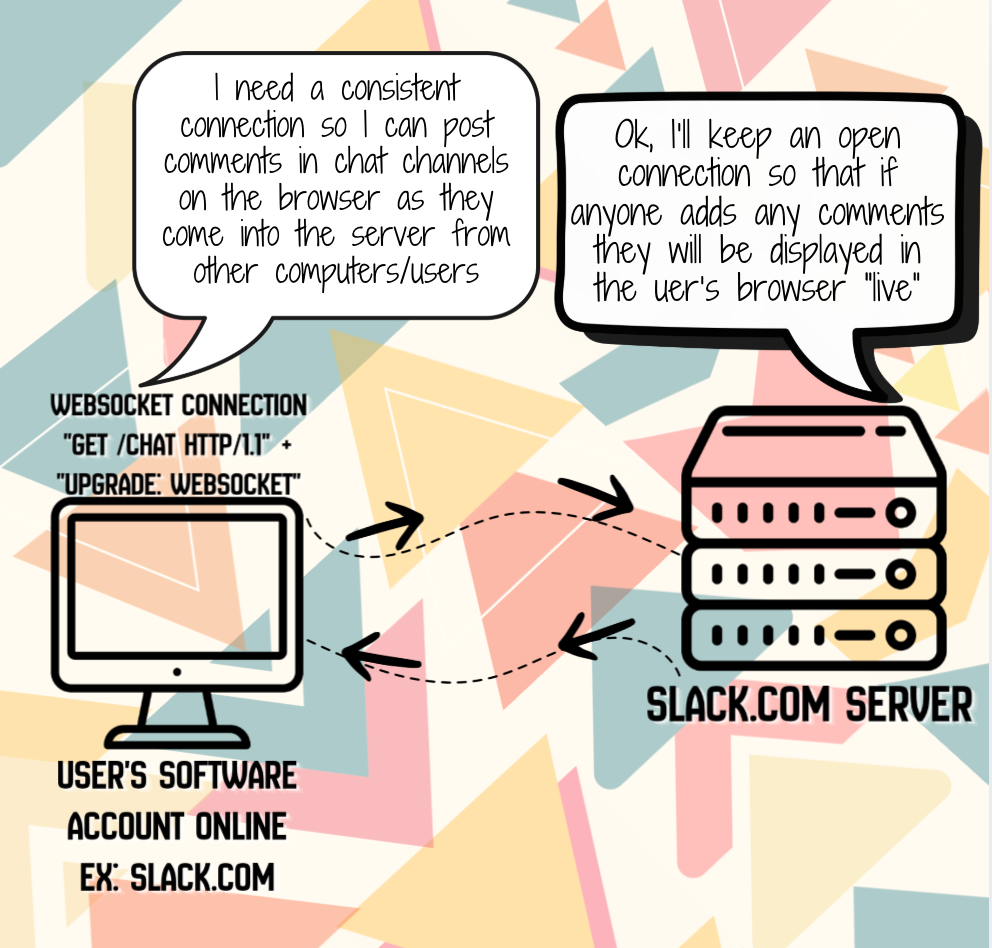
A group of developers (including Ian Hickson who worked on the HTML5 specification) pushed for the WebSocket protocol, which was standardized by the IETF in 2011 (RFC 6455). Instead of the client constantly asking for updates, WebSocket opens a persistent, bidirectional connection between client and server. Both sides can send data anytime without waiting for requests.
The Solution: WebSocket establishes a single, persistent connection that stays open, allowing both client and server to push data instantly. The connection starts as HTTP, then "upgrades" to WebSocket protocol.
Examples:
- Chat Applications:
ws://chat.example.com- Both users can send messages instantly without refreshing - Live Dashboards: Stock prices, sports scores, or monitoring data update in real-time
- Collaborative Editing: Google Docs-style applications where multiple users edit simultaneously
- Gaming: Multiplayer games with real-time player movement and actions
- Notifications: Live alerts pushed to users without them checking
WebSocket Connection Flow:
Client: "GET /chat HTTP/1.1" + "Upgrade: websocket"
Server: "HTTP/1.1 101 Switching Protocols" + "Upgrade: websocket"
Connection established - now both can send messages anytime:
Client → Server: "Hello!"
Server → Client: "Hi there!"
Server → Client: "New message from user2"
Client → Server: "Thanks!"
Why Websocket API's Made Things Better:
- True real-time communication with minimal latency
- Dramatically reduced bandwidth (no HTTP headers after initial handshake)
- Lower server load (no repeated polling requests)
- Bidirectional communication (both client and server can initiate messages)
- Perfect for chat apps, live dashboards, gaming, and collaborative tools
Webhooks: Event-Driven Notifications Between Systems
As companies built more integrated systems, polling for changes had limitations. Applications needed a way to notify each other instantly when events occurred, without constantly checking "has anything changed?"
Back in 2007-2010, developers integrating multiple services were struggling with synchronization. When a payment was processed in Stripe, or a new order came in to Shopify, or a user signed up in Auth0, other systems needed to know about these events. With traditional APIs, developers had two bad options:
Constant Polling: System A calls GET /orders every minute to check for new orders. This created unnecessary API calls, most returning "no new orders," and there was always a delay of up to a minute before systems knew about changes.
Manual Triggers: Users had to click "Sync Now" buttons or run scripts to push data between systems. This was error-prone and meant data was often out of sync.
Neither option was good. Companies wanted their systems to work together seamlessly in real-time, but constantly polling APIs was inefficient and manual triggers were unreliable.
The concept of webhooks (coined by Jeff Lindsay in 2007, inspired by Git's hooks) emerged as a solution. Instead of systems constantly asking "anything new?", the source system sends an HTTP POST request to a URL you specify whenever an event occurs. It's like giving the system your phone number and saying "call me when something happens."
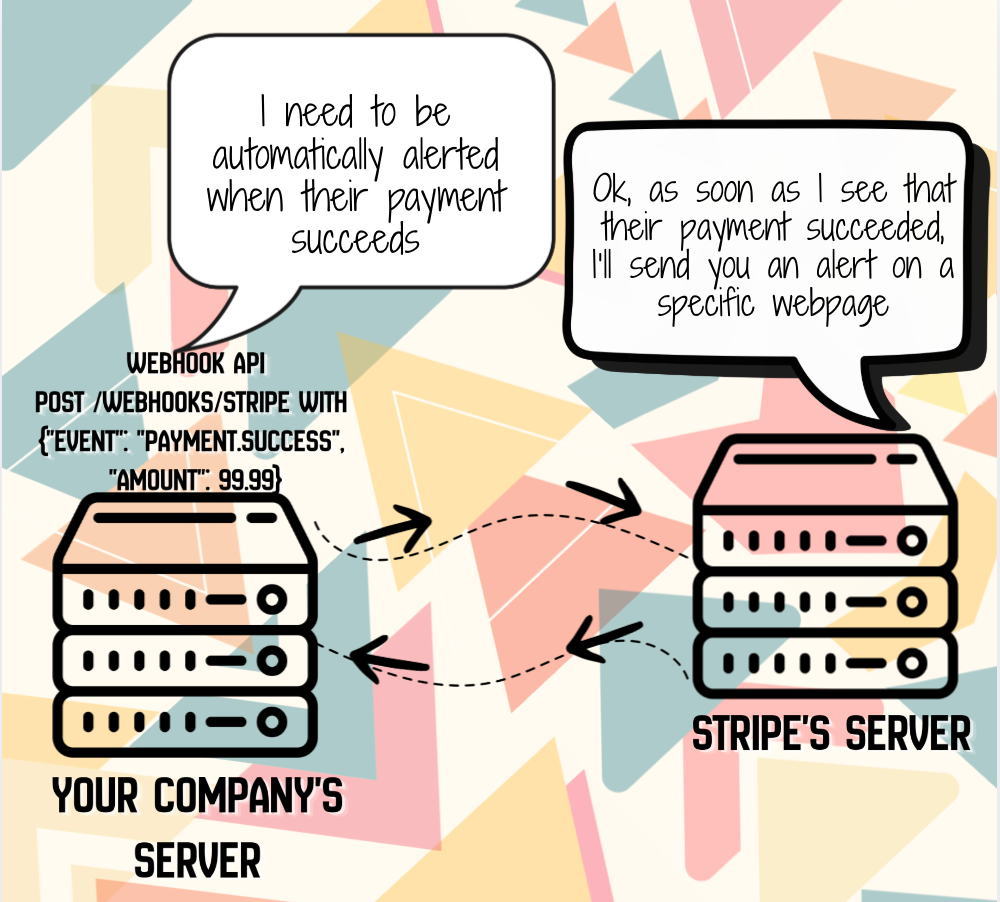
The Solution: Webhooks let you register a callback URL with a service. When specific events occur, the service automatically sends an HTTP POST request to your URL with event data. You don't poll; you receive notifications instantly.
How it Works
The webhook URL is configured on Stripe's side, but the endpoint that receives the webhook is on your company's server.
Here's how it works:
Your Server:
- You create an endpoint on your server to receive webhooks (like https://yourcompany.com/webhooks/stripe)
- This endpoint listens for incoming HTTP POST requests from Stripe
- When it receives a payment notification, your server processes it (updates your database, sends confirmation emails, etc.)
Stripe's Side: - You log into your Stripe Dashboard or use Stripe's API
- You tell Stripe: "Send payment notifications to https://yourcompany.com/webhooks/stripe"
- Stripe stores this URL and sends HTTP POST requests to it whenever payment events occur
The Flow:
- Customer makes a payment on your website
- Stripe processes the payment
- Stripe sends an HTTP POST request to YOUR server at the webhook URL you configured
- Your server receives the notification and takes action (like updating order status)
So you're essentially giving Stripe your server's "phone number" (the webhook URL) and saying "call me when a payment happens." Stripe does the calling, but your server is the one receiving the call.
Examples:
- Payment Processing: Stripe sends a webhook to your server when a payment succeeds:
POST /webhooks/stripewith{"event": "payment.success", "amount": 99.99} - E-commerce: Shopify notifies your inventory system when an order is placed:
POST /webhooks/shopifywith{"event": "order.created", "items": [...]} - User Management: Auth0 sends a webhook when a new user signs up:
POST /webhooks/auth0with{"event": "user.created", "email": "user@example.com"} - CI/CD: GitHub notifies your deployment system when code is pushed:
POST /webhooks/githubwith{"event": "push", "branch": "main"} - Form Submissions: Typeform or Google Forms send webhooks when forms are submitted
Webhook Flow:
1. You register your webhook URL with the service:
   POST /api/webhooks
   {"url": "https://yourapp.com/webhooks/stripe", "events": ["payment.success"]}

2. When an event occurs, the service sends:
   POST https://yourapp.com/webhooks/stripe
   Headers: X-Stripe-Signature: <signature>
   Body: {"event": "payment.success", "data": {...}}

3. Your server processes the event and returns 200 OK
Why Websocket API's Made Things Better
- Real-time event notifications without polling
- Reduced API calls and server load
- Instant synchronization between systems
- Event-driven architecture (react to changes as they happen)
- Works with any system that can receive HTTP requests
Wave 5: GraphQL
As applications became more data-hungry, even REST had limitations. Facebook created GraphQL to solve the problem of over-fetching and under-fetching data.
Back in 2012, Facebook's mobile app was struggling. The app needed to show user profiles with posts, comments, likes, and friend information. With REST, the mobile app had two bad options:
- Over-fetching: Call
GET /users/123and get back the entire user object with 50 fields, even though the app only needed the user's name and profile picture. This wasted bandwidth on mobile networks. - Under-fetching: Call
GET /users/123for basic info, thenGET /users/123/postsfor posts, thenGET /posts/456/commentsfor comments on each post. This meant multiple round trips to the server, making the app slow. - Being limited to using the queries that the developer of the API's allow.
Neither option was good. Mobile users wanted fast apps that didn't drain their data plans, but REST's rigid endpoint structure couldn't give them exactly what they needed efficiently.
The Solution: Facebook's engineers (led by Lee Byron) built GraphQL. Instead of the server deciding what data each endpoint returns and a developer deciding what queries are allowed, GraphQL lets the client (the mobile app or website) specify exactly what data it wants in a single request. With GraphQL, you can request any combination of fields and nested relationships that the database schema(structure) supports for requesting, editing, and deleting data with API's. You can even query the GraphQL API itself to ask "what types and queries are available?" This enables amazing developer tools like GraphiQL and Apollo Studio.
Later they open-sourced GraphQL in 2015 which allowed it to grow in popularity.
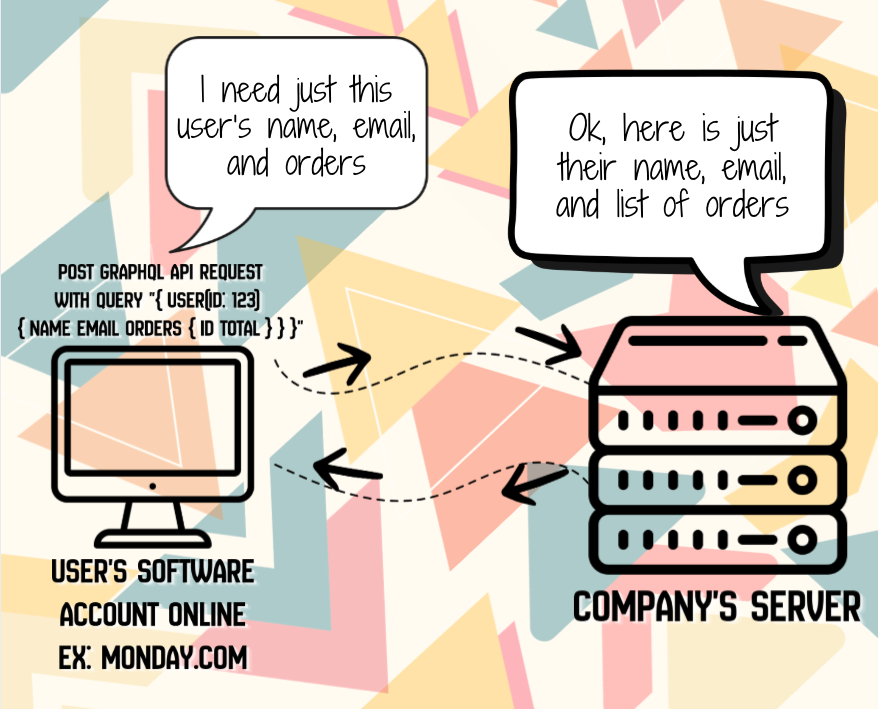
Examples:
- GraphQL:
POST /graphqlwith query{ user(id: 123) { name email orders { id total } } } - gRPC: High-performance RPC framework using Protocol Buffers
- WebSocket APIs: Real-time bidirectional communication for chat apps, live updates like posts on a feed page in social media apps
Why GraphQL API's Made Things Better
- You only get exactly what you ask for, saving bandwidth and making apps faster
- Get all the data you need in one call instead of hitting multiple endpoints
- Smaller, faster responses mean less data usage and better battery life
- The API tells you what's available when you ask, so you don't have to guess or read endless docs
- Mobile, web, and desktop apps can each request exactly what they need from the same API
- Add new fields without breaking existing apps
Great developer tools: Auto-complete, real-time previews, and powerful debugging tools come built-in
Wave 6: Public APIs: For Everyone, Not Just Developers
Here's something cool: many companies don't just use APIs internally—they make them publicly available for everyday people (well, everyday developers and tech-savvy folks) to use!
Why Companies Share Their APIs
Companies like Monday.com, Stripe, Twitter, Google, Slack, and hundreds of others publish their APIs for several reasons:
- Extend their platform: Let others build integrations and features they never thought of
- Create ecosystems: The more people build on your API, the more valuable your platform becomes
- Enable automation: Let users connect your tool with their other tools
- Drive adoption: Easy-to-use APIs attract more developers and customers
- Generate revenue: Many APIs are monetized (pay per call, subscription tiers, etc.)
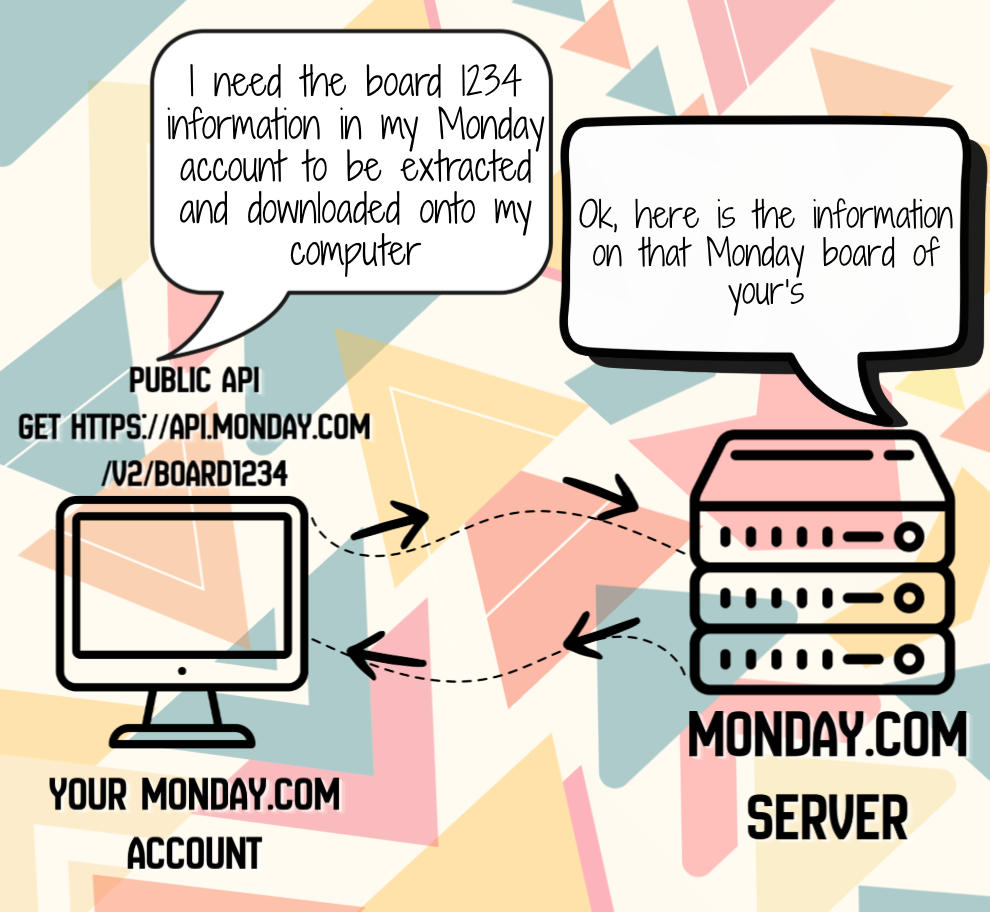
Real-World Example: Monday.com:
- Find the docs: Go to developers.monday.com
- Get access: Create a developer account, generate an API token
- Example of what you can do:
GET https://api.monday.com/v2
Authorization: YOUR_API_TOKEN
Get all boards
query { boards { id name } }
Create a new item in a boardmutation {
create_item(board_id: 123456, item_name: "New Task") {
id
}
}
- Use cases:
- Automatically create tasks when emails arrive
- Sync Monday.com boards with other project management tools
- Generate custom reports by pulling data from multiple boards
- Trigger workflows when items change status
The beauty? You didn't have to submit a feature request. You just used some of the API calls that Monday offers for users to use to create "features" yourself in order to get what you wanted. This is the power of public APIs—they let you stand on the shoulders of giants and build amazing products without reinventing the wheel and use what they (the company) already offers.
Other Popular Public APIs
- Google Maps API: Add maps and location services to your app
- Twilio API: Send SMS messages and make phone calls programmatically
- Slack API: Build bots and integrations for Slack workspaces
- GitHub API: Interact with repositories, issues, and pull requests
- OpenAI API: Add AI capabilities like ChatGPT to your applications/software
These APIs are typically REST-based (remember that resource-based architecture we talked about?), making them easy to understand and integrate with.
Why Public API's Made Things Better
They expanded what softwares and online platform can do for customers by allowing customers to use them to customize how they use the softwares and platforms to get what they want.
Wave 7: OpenAI API's
OpenAI API: Democratizing Access to Advanced AI
As artificial intelligence became more powerful, building AI capabilities from scratch had limitations. Companies needed advanced language models, image generation, and AI reasoning, but training these models required millions of dollars, massive computing resources, and years of research.
Back in 2020-2022, businesses wanted to add AI features to their products but faced huge barriers. They needed capabilities like natural language understanding, text generation, code completion, or image creation. With traditional approaches, companies had two bad options:
Build from Scratch: Train your own AI models. This required hiring PhD researchers, buying hundreds of GPUs (costing millions), collecting massive datasets, and spending years on research. Even then, your models would likely be inferior to state-of-the-art solutions.
Use Basic ML Services: Rely on simple machine learning APIs for sentiment analysis or image recognition. These were limited in capability and couldn't handle complex tasks like generating human-like text, understanding context, or creative problem-solving.
Neither option was good. Startups and established companies alike wanted to leverage cutting-edge AI, but the cost and expertise required made it impossible for most organizations.
OpenAI (founded in 2015, with Microsoft as a major investor) released their API in 2020, starting with GPT-3. In 2022, they launched ChatGPT and expanded their API offerings dramatically. Instead of companies needing to build their own AI, OpenAI provided API access to some of the world's most advanced AI models. You send a request with your prompt or data, and OpenAI's models return intelligent responses.
The Solution: OpenAI's API provides access to powerful AI models through simple HTTP requests. Developers can integrate advanced AI capabilities into their applications with just a few lines of code, paying only for what they use.
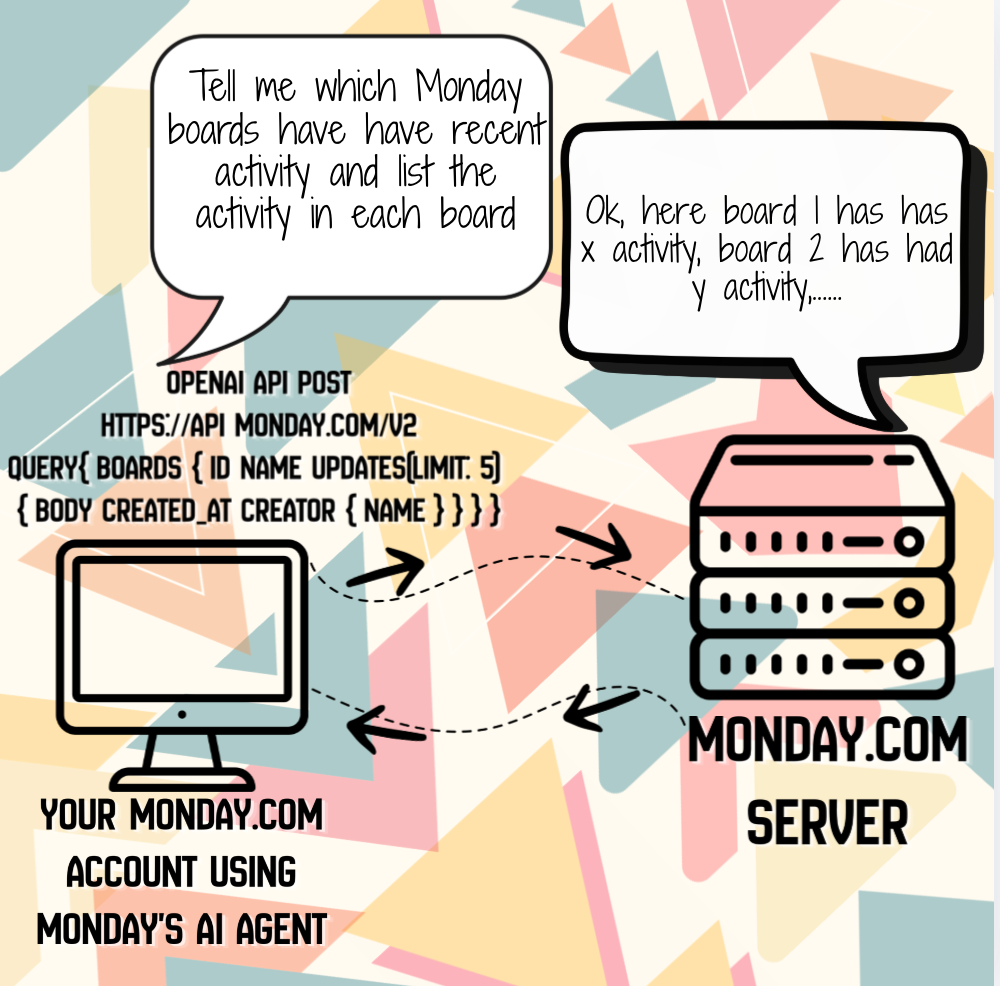
Examples:
- Text Generation:
POST https://api.openai.com/v1/chat/completionswith{"model": "gpt-4", "messages": [{"role": "user", "content": "Write a poem about APIs"}]} - Code Completion: GitHub Copilot uses OpenAI's models to suggest code as developers type
- Image Generation:
POST https://api.openai.com/v1/images/generationswith{"prompt": "A futuristic city at sunset", "size": "1024x1024"} - Embeddings: Convert text to vectors for semantic search:
POST https://api.openai.com/v1/embeddingswith{"input": "Hello world", "model": "text-embedding-3-small"} - Speech-to-Text: Transcribe audio:
POST https://api.openai.com/v1/audio/transcriptionswith audio file - Text-to-Speech: Convert text to natural speech: `POST https://api.openai.com/v1/audio/speech
Why OpenAI API's Made Things Better
- Access to state-of-the-art AI without massive infrastructure investment
- Pay-as-you-go pricing (pay per token or per image)
- Continuous improvements (models get better over time automatically)
- Wide range of capabilities (text generation, code completion, image creation, speech recognition, embeddings)
- Simple integration (standard REST API with JSON)
What They're Used For Today
RPC/SOAP - Known as Single EndPoint API
- Enterprise systems that need strict contracts and validation
- Financial services and banking (many legacy systems still run on SOAP)
- Web services that need built-in security standards (WS-Security)
- Legacy system integration where companies have decades-old infrastructure
- Complex operations where you're calling specific business logic functions
REST - Known as Resource-Based API
- Web and mobile applications (most modern apps use REST)
- Public APIs (Twitter, Stripe, GitHub—almost all use REST)
- Microservices architectures
- Cloud services and serverless functions
- IoT devices that need lightweight communication
AJAX - Known as Asynchronous Background Requests
- Single-page applications (SPAs) like Gmail and Google Maps
- Live search and autocomplete features
- Form validation without page reloads
- Infinite scroll feeds (social media timelines)
- Real-time notifications in web apps
- Dynamic content loading (like "Load More" buttons)
WebSockets - Known as Real-Time Bidirectional Communication
- Chat applications (Slack, Discord, WhatsApp Web)
- Live dashboards and monitoring systems
- Online multiplayer gaming
- Collaborative editing tools (Google Docs, Figma)
- Financial trading platforms with live stock prices
- Live sports score updates
- IoT device communication requiring instant updates
Webhooks - Known as Event-Driven Notifications
- Payment processing notifications (Stripe, PayPal alerting your system when payments complete)
- CI/CD pipeline triggers (GitHub notifying deployment systems when code is pushed)
- E-commerce order processing (Shopify notifying inventory systems of new orders)
- Chatbot integrations (Slack, Discord, Teams receiving messages)
- CRM synchronization (updating customer records across systems)
- Automated workflows (Zapier, Make connecting different services)
- Form submission handling (Typeform, Google Forms sending data to your backend)
GraphQL - Modern Day Single EndPoint
- Facebook/Meta: Uses GraphQL across all their apps (Facebook, Instagram, WhatsApp)
- GitHub: Migrated their entire API to GraphQL in 2016
- Shopify: Built their Storefront API with GraphQL
- Twitter: Uses GraphQL for their web and mobile apps
- Yelp, Airbnb, Pinterest, PayPal: All use GraphQL in production
Public APIs - Known as Developer-Facing APIs
Through Automation Platforms:
- Zapier/Make/IFTTT: Connect apps automatically (e.g., "When I get a new email with an attachment, save it to Dropbox and notify me on Slack")
- No-code workflows: Automatically post to social media, send emails, or update spreadsheets when events happen
- Example: Automatically save Instagram photos to Google Drive, or tweet when your RSS feed updates
By looking up a company's list of API's and creating your own integrations, examples:
- Monday.com API Integration:
- Sync Monday.com boards with tools like Jira, Trello, or Asana so teams can work in their preferred too
- Generate weekly status reports by pulling data from all active boards and emailing it to managers
- Slack API Integration:
- Send a Slack notification to the #sales channel every time a new lead is captured in your CRM
- Build a bot that answers frequently asked questions when team members type /help
- Pelican Wireless Controls
- Build a dashboard that shows the health of all your wireless devices across multiple office locations in one view
- Automatically send an email or Slack message when a device goes offline so IT can respond quickly
OpenAI API - Known as AI-as-a-Service
- Chatbots and virtual assistants (customer support, AI companions)
- Content generation (blog posts, marketing copy, product descriptions)
- Code completion and assistance (GitHub Copilot, Cursor)
- Image generation (DALL-E for marketing materials, design tools)
- Text summarization and analysis
- Translation and language processing
- Agentic AI systems (automated development and testing workflows)
- Data extraction and structuring from unstructured text
- Personalized recommendations and content curation
So there you have it!
So there you have it! APIs have evolved through multiple waves to solve different problems.
- The first wave (RPC/SOAP) in the 1980s-1990s solved the problem of servers talking to servers across corporate networks.
- The second wave (AJAX) in the early 2000s solved the problem of making web pages interactive without constant reloading.
- The third wave (REST) in the 2000s-2010s simplified everything for the mobile and web app explosion.
- The forth was Websockets and Webhooks which allowed for live connections on webpages to get live updates and automatically trigger actions like alerts when specific actions took place in another software.
- Wave 5 was GraphQL, which went back to a single endpoint with better queries to get more specific information with one API call.
- Wave 6 was Public API's, which put the power of customizing and expanding what a company's software can do in the hands of tech savvy users.
- Wave 7 was OpenAI's API called, which made using technology and setting up integrations between software like talking to a friend/assistant.
Today, REST is the clear winner in popularity, powering most of the APIs we interact with daily—including the public APIs that let everyday developers build amazing products by leveraging services like Stripe, Google Maps, and countless others. But the API landscape is richer than ever, with specialized tools for every use case: WebSockets for real-time apps, Webhooks for event-driven integrations, GraphQL for flexible data fetching, and AI APIs that bring intelligent features to any application.
As AI agents become more prevalent in development and testing, they're making all these architectures more accessible and easier to work with. Whether you're building the next big app, integrating with a SaaS product, maintaining legacy systems, or creating real-time collaborative tools, understanding these different waves and architectures helps you make better decisions about how your software communicates.
Happy coding, and may your API calls always return 200 OK!