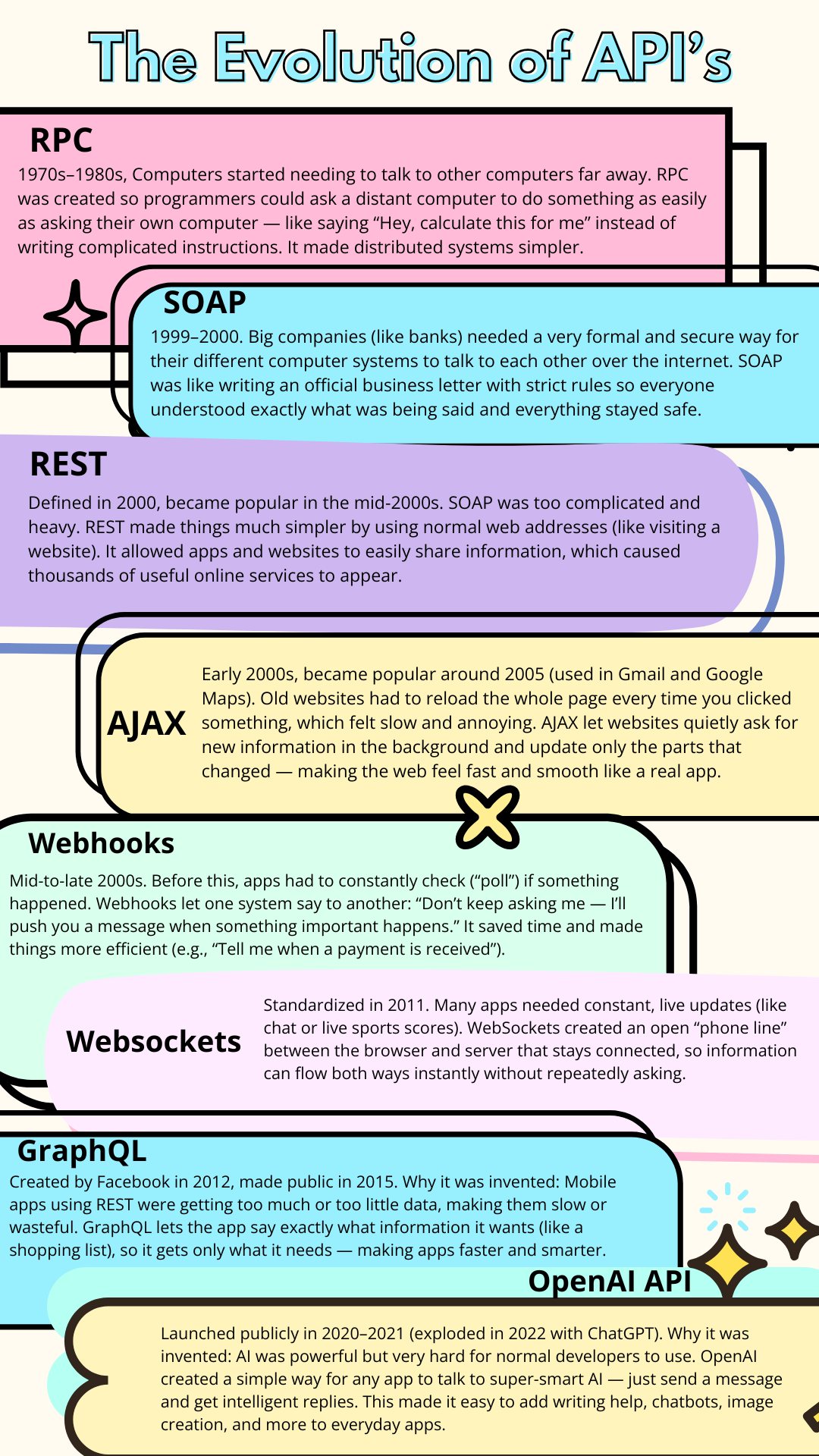
The Evolution of API Calls
How Data Moves Across the Internet by the Magic of API Calls — And Why You Should Care (Even If You’re Not Tech Savvy)
These days, 80–95%+ of mobile app traffic is API calls. That means that 80-95% of the time you are using an app like Instagram or DoorDash, it's sending your requests to the company's server using API calls and updating things in the app based on the server's API calls responses. These API calls are based on what you clicked on in the app, they are how you get automatic updates/alerts, see live estimated wait times etc.
Around 70–83% of web traffic is API calls. That means that 70-83% of the time you are interacting with a web page like Amazon or online software like Monday.com, API calls are what's sending your requests to the company's server and updating the page based on what you clicked and requested.
What is an API Call
An API call is like sending a polite request to a waiter in a restaurant. You don’t need to know how the kitchen works — you just tell the waiter what you want (“Bring me a coffee and my friend’s profile”), and they bring back exactly what you asked for.
In the digital world, when you use an app like DuckBuddy (a social media platform like Reddit or Discord for remote workers to find other remote workers to have community with based on matching algorithms), magic happens behind the scenes through API calls every time you click or tap something. For example, when you search for remote workers who love hiking, your app quietly sends a message like “Show me people in Europe who enjoy hiking.” The server processes that request and sends back only the useful information. Different types of API calls (REST, GraphQL, WebSockets, etc.) handle everything from loading profiles and live chat messages to powering the smart DuckBuddy Agent that recommends connections.
Here’s what’s really going on:
- You click on a profile → A REST (or GraphQL) API call using the GET method quietly asks the server, “Send me this person’s picture, personality traits, current job, and hobbies.”
- You scroll through the feed → Multiple smaller REST API calls (powered by AJAX) fetch (GET) the latest posts and updates from chat rooms you follow.
- You join a live chat room → WebSocket API calls keep a connection open so new messages appear instantly.
- You get a notification → A webhook API call pushes an alert to your phone saying “Anna just sent you a connection request.”
- You use the DuckBuddy Agent (Premium) → An OpenAI API call (or a similar AI API using REST based API calls) sends your request to the smart AI, which analyzes thousands of profiles and brings back the best matches for you.
Whether you’re on the app or in your browser on a computer, every tap, search, or button click triggers one or more API calls. These calls are the invisible delivery system that brings you exactly the pictures, profiles, chat messages, alerts, and recommendations you asked for — quickly and smoothly.
Why This Matters for Non-Tech People
Understanding API calls at a basic level helps you:
- Know why apps feel fast or slow
- Make better decisions when choosing tools and platforms
- Feel more confident when something goes wrong (“Is the server down or is it just this feature?”)
- Appreciate the magic behind features like instant chat, smart recommendations, and seamless payments
Practical Examples of Different API Calls
Here are practical examples of each technology working inside a social media platform called DuckBuddy for remote workers to find other remote workers to have community with:
1. REST API
Example: A user opens the DuckBuddy mobile app and browses profiles.
The app sends a request:
GET https://api.duckbuddy.com/profiles?location=Europe&workType=developer&hobbies=gaming
The server returns a list of matching profiles. This is an example of a REST GET API call with a query for specific information.
- Used for: Searching profiles, loading your feed, viewing someone’s personality, age, and dream job.
2. GraphQL
Example: When viewing a detailed profile, the app only wants the person’s name, current job, hobbies, and compatibility score — nothing else.
Query:
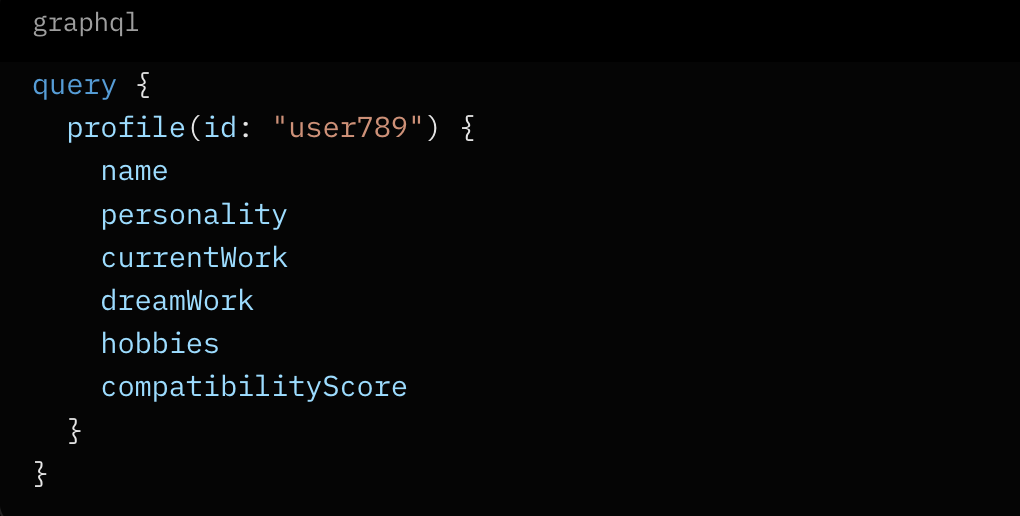
- Used for: Making the app fast and data-efficient, especially on mobile.
3. AJAX
Example: You’re on a profile page and click a "Send Message" button.
The request is sent quietly in the background, and only the button changes to “Request Sent” — the whole page does not reload.
- Used for: Buttons that trigger API calls like this provide smooth interactions like liking profiles, joining chat rooms, or updating your own profile without annoying page refreshes.
4. WebSockets
Example: You join a live chat room called “Digital Nomads in Spain.”
A persistent connection stays open across the internet from your browser to the DuckBuddy server so messages appear on the web page instantly for everyone in the room. This allow allows you to switch from text chat to live video chat without leaving the room.
- Used for: Real-time live chatting and video features.
5. Webhooks
Example: Someone sends you a connection request or invites you to their new chat room.
Instead of you constantly checking, DuckBuddy’s server automatically sends a webhook (push notification) to your phone saying “New connection request from Anna!”
- Used for: Instant notifications for new messages, chat invites, or premium matches.
6. RPC (Remote Procedure Call)
Example: Inside DuckBuddy’s own servers, the Chat Service calls the User Service to quickly check if a person is online and allowed in a private room.
It simply says: IsUserAllowedInRoom(userId: "abc123", roomId: "nomads-spain")
- Used for: Fast communication between DuckBuddy’s internal systems.
7. SOAP
Example: When a user pays for Premium using a credit card, DuckBuddy sends a formal request to the bank’s old payment system.
It uses a detailed, official SOAP message with all the transaction details.
- Used for: Talking to big banks or government systems that require strict old-school formats.
8. OpenAI API
Example: A Premium user activates the DuckBuddy Agent.
They type: “Find me remote marketing managers in Europe who love hiking and want to work in startups.”
DuckBuddy sends this to the OpenAI API, which intelligently analyzes profiles and suggests the best matches with explanations.
- Used for: The smart AI agent that helps premium users find better connections faster.
In a common SAAS based platform like DuckBuddy, these different technologies work together to make it feel modern, fast, and intelligent for the end user, the customer:
- REST + GraphQL + AJAX = smooth browsing and searching
- WebSockets = live chat & video
- Webhooks = instant notifications
- OpenAI API = the smart DuckBuddy Agent