Chromium: The Behind the Scenes Hero Powering Modern Web Testing
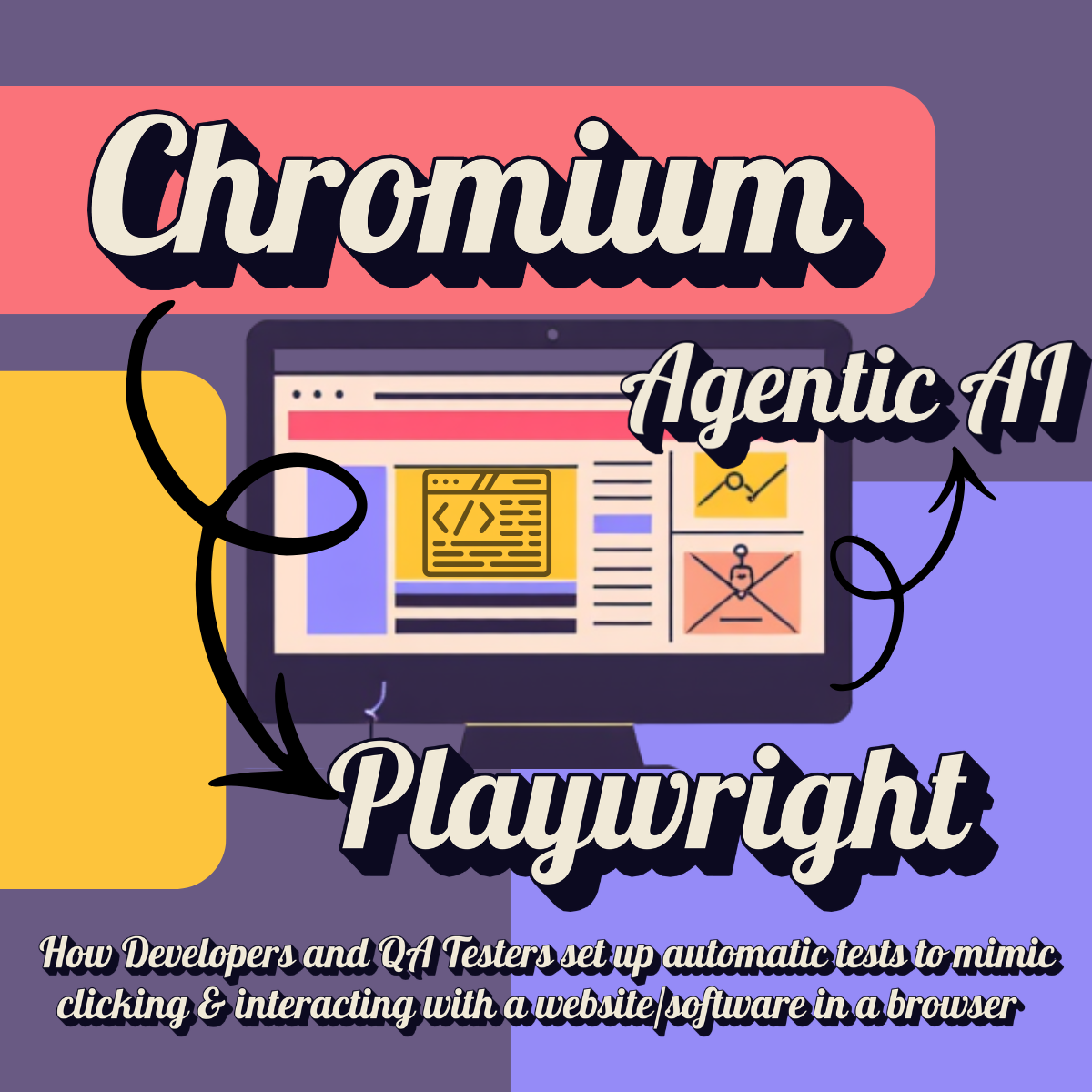
If you’re building or testing web applications today, there’s a good chance Chromium is working hard behind the scenes for you — even if you’ve never written a line of browser automation test code. What Chromium is, how it differs from Chrome, what actually does it actually do, and how does it powers everything from a developer’s pre-PR validation to full QA processes and the new wave of agentic AI testing, let’s break it all down in a practical, real-world way.
What Is Chromium?
Chromium is Google’s open-source web browser project. It’s the foundational engine that powers Google Chrome and many other browsers (Microsoft Edge, Brave, Opera, and more).
How it’s different from Chrome:
- Chromium = The free, open-source core. Anyone can download, modify, and build on it.
- Chrome = Chromium + Google’s proprietary additions (automatic updates, Google account integration, extra security features, telemetry, and some closed-source code).
Think of Chromium as the raw, customizable engine and Chrome as the polished consumer product with the skin and custom features on top.
What Does Chromium Actually Do?
Chromium is a full web browser engine. A web browser engine (also known as a rendering or layout engine) is the core software component of a web browser. It acts as a bridge between a web page's code and your screen, taking raw data like HTML, CSS, and images, and translating it into the visual, interactive page you see. Its major components include:
- Blink — the rendering engine that turns HTML, CSS, and JavaScript into the pages you see. HTML is the basic "words on a page" structure of a website, CCS give that colors and shape, and Javascript makes elements on the page interactive.
- V8 — the ultra-fast JavaScript engine that renders the elements on the page that are interactive thanks to Javascript, like drop down menus, popups when you hover your mouse over certain things on the website, pictures or quotes that automatically scroll across the page etc.
- Networking, security sandboxing, GPU acceleration, DevTools (or Inspect Tool- the option you see when you right click on a webpage), and support for modern web standards.
One of its most powerful features for developers and testers is headless mode — running the browser you are interacting with or testing in invisibly in the background. This is perfect for automated testing (see more below) when you need to validate new code without having to manually click on each part of the page to test it. You can also run it in headed mode where you can watch Chromium interact with the webpage like watching a real user interact with a webpage.
Chromium in Automated Testing: Selenium, Puppeteer, and Playwright
Because Chromium is open-source and controllable, it became the backbone of modern web testing tools for developers and QA testers when they need to validate new code or code changes before they are deployed to production where end users interact with them:
- Selenium WebDriver: This is classic tool that arrive on the scene in 2004. It can drive Chromium (or Chrome) to simulate user interactions like clicking, typing, and scrolling.
- Puppeteer (built by Google): Is a Node.js library with very fine-grained control over Chromium, which came out in 2017. Great for screenshots, PDF generation, and precise scripting.
- Playwright (by Microsoft): Is the current favorite for many teams, which was released in 2020. It offers a clean API, excellent auto-waiting (auto waiting for certain elements on the page to load in), cross-browser support (can work in more than one browser type), emulate a mobile device for testing changes on the website/software and how they appear on the phone, and powerful debugging. It controls Chromium extremely reliably.
These tools let you (the developer or QA tester) write computer scripts that open a real browser, interact with your website/software according to your script, and make assertions about the results. Rather than having a developer or QA tester manually click through each needed step or process in the webpage or software to validate a bug fix or new feature, with Playwright (and the others) you can build a script that runs through all the button clicking on the webpage or software every time you need to test certain elements.
Developer Phase: Validating Code Before Submitting a Pull Request (PR)
When a developer (or their AI coding assistant) finishes a bug fix or new feature — like fixing an empty dropdown menu on a webpage— they want to validate it before creating a PR (pull request to merge their change into the main code base).
Here’s how Chromium + Playwright typically work together:
- The developer writes (or generates) Playwright tests that specifically target the change they made in the code. This saves time, especially when a developer make several iterations of the bug fix and needs to test each one until he gets it right. As soon as the script in Playwright runs into a breaking point, the developer can rewrite (or have his agent rewrite) the code based on where the fail happened, then run another "build" (a process that converts the code from human readable language to code that a computer can read, verify, and check for issues) in his development environment and run the test script again to validate the fix.
- They run these tests locally in their development environment on their local machine/computer or in a lightweight CI (Continuous Integration) job against their branch (part of the code they are working on separate from the main code base). A lightweight CI job is actually a small part of the larger PR (pull request) process. It runs every single time a developer saves their work and pushes code to their personal branch that they are working on. This happens multiple times a day while the developer is still actively writing code making changes here and there as they build the new feature or fix the bug. The true PR merge happens only once at the very end of the feature development or bug fix. It occurs when the developer is completely finished and wants to combine their code with the main project by submitting a PR where another developer reviews it and then accepts the merge.
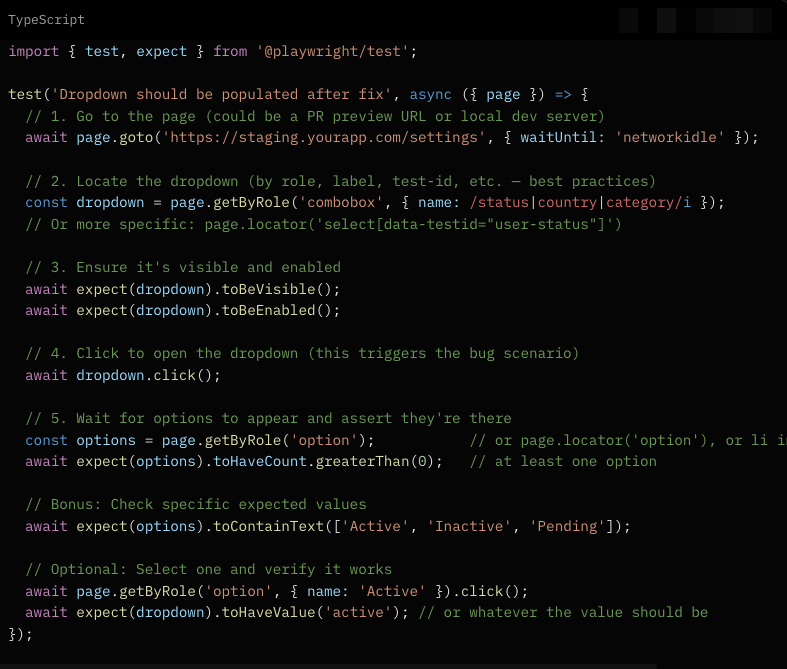
- The tests launch Chromium (often headless aka invisibly), and uses Playwright to navigate to the page, click the dropdown, verify options appear, try different scenarios, and confirm the code fix works.
- If tests pass, developers submit the PR with greater confidence.
Benefits at this stage:
- Fast feedback loop.
- Catches basic regressions early.
- Encourages developers to ship higher-quality code.
- Here is an example of a Playwright script that a developer would write.
What Chromium Is Doing Behind the Scenes
While Playwright runs the script above, Chromium is:
- Loading the full page (HTML + CSS + JS bundles and whatever all developers used to create the webpage/software).
- Executing the webpage/software’s JavaScript (the part that makes elements on the webpage interactive like React, Vue, Angular, whatever framework they use for JavaScript). This is often where a bug for a dropdown menu would live — maybe a useEffect failed to fetch/populate the options in dropdown data, or an API call to fetch the options in the drop down menu was broken, or a state variable was null (where the page looks to find the options for the dropdown menu was empty) .
- Handling the click event when Playwright says "dropdown.click()". Chromium fires the real browser click, which opens the <select> or custom dropdown component.
- Rendering the options in the DOM (Document Object Model- the programming interface for web documents, HTML, CSS, Javascript etc. It loads everything needed for the webpage and puts everything in order. This allows JavaScript to dynamically read, modify, or update elements on the screen). Playwright then queries that live DOM to locate, verify, and interact with web elements during automated testing.
- Providing visibility into everything — it checks network requests, console errors, performance, etc in the DevTools/Inspect Tools to find issues on the webpage or online software.
The Extra Power that Playwright Gives You
- API Testing: "page.route()" to mock APIs (so you can control what data comes back).
- Visual regression: Take a screenshot of the open dropdown before/after the fix and video recording on failure.
- Accessibility: "await expect(dropdown).toHaveAccessibleDescription(...)" or check ARIA roles.
- Mobile: Test the same dropdown using "page.setViewportSize({ width: 375, height: 667 })" to emulate phones.
- Flaky data: Use "page.route()" to always return consistent test data so the dropdown isn’t dependent on flaky backend state.
- Timeline of what happened: a beautiful timeline of everything that Chromium and Playwright did.
In a real workflow:
- The developer opens a PR → CI pipeline spins up.
- Playwright launches fresh Chromium instances.
- It deploys the PR branch to a preview environment (or runs locally).
- The test above runs against that version.
- Before the fix: Test fails → "Expected > 0 options, got 0".
- After the fix: Test passes → dropdown populates correctly.
You can even run the Playwright script to test the code across Chromium + Firefox + WebKit in parallel with one command:

Why Chromium and Playwright Together Is So Effective
Chromium gives you a real browser (not a fake simulator), so you catch real-world issues:
- CSS styling issues on the page like colors and shapes of buttons etc
- JavaScript timing of loading interactive elements like drop down menu items etc
- Shadow DOM a private, hidden DOM hidden inside a specific web component like a video
- Canvas which gives you pixel-by-pixel control to generate visuals on the fly) instead of using traditional HTML elements (like text and buttons).
Playwright makes controlling the browser pleasant and reliable, with excellent debugging.
Developers Using Agentic AI With Chromium and Playwright
Many developers now use agentic AI for creating code and testing code. Agents can read and understand the reported bug or feature requests in Monday or Jira, analyze the part of the code that affects the reported bug, suggest code changes, create QA test cases, and even estimate the time to change the code and test the code changes. The AI can analyze the code changes created by a developer, generate relevant Playwright tests, run them via Chromium, and even suggest improvements — dramatically speeding up this pre-PR (pull request) validation. The benefits of using an agent in this way include:
1. Massive Speed & Faster Feedback Loops
- A human developer or QA might take 10–60 minutes (or longer) to write, debug, and validate a good test.
- An agentic AI can analyze the ticket/PR description, explore the app, generate relevant Playwright tests, run them, and report results in minutes — sometimes under 5–10 minutes end-to-end.
2. Broader & More Exploratory Test Coverage
- It can automatically click the dropdown, try every possible option, test with different user roles/permissions, test on mobile vs desktop, test with slow networks, test error states, etc. Although usually testing every test case senerios is done in the formal QA stage
- For dropdown menu bug example: The AI might discover related issues like “dropdown doesn’t repopulate after form reset” or “options disappear on language change” that a human might not think to test right away.
3. Reduced Human Toil & Scalability
- Teams can test many more features and bug fixes without growing the QA team linearly.
- One AI agent (or a swarm of them) can work in parallel across dozens of tickets while humans focus on complex, high-value work.
4. Consistency & Reduced Human Error
- AI follows the same rigorous process every time. It doesn’t get tired or skip steps.
- It can generate consistent, well-structured Playwright code with good selectors (using getByRole, getByTestId, etc.) and proper assertions.
5. Better at Handling Complexity
- Agentic AI with Playwright + Chromium can:
- Observe the live DOM and network traffic in real time.
- Adapt to async loading (wait for dropdown options to appear).
- Handle shadow DOM, canvas, SPAs, and complex component libraries better than rigid old scripts.
- Self-heal some flaky tests by retrying with different conditions automatically.
6. Continuous Learning & Regression Prevention
- After fixing the dropdown bug, the AI can save the new test into the test suite.
- Future changes to that dropdown will automatically be protected.
- Over time, the AI builds a rich regression suite tailored to your actual app behavior.
Real-World Example: Dropdown Menu Bug Fix
When a PR (pull request) fixing an empty dropdown comes in:
- The agent navigates to the page using Chromium.
- It detects the dropdown, clicks it, analyzes the DOM before & after the fix.
- It generates a targeted Playwright test (very similar to the one I showed earlier).
- It runs the test against both the old (broken) and new (fixed) version in the developer's environment.
- It produces a report possibly with screenshots, logs, and even suggests improvements to the fix (based on the guidelines given to it by the developer).
QA Tester Phase: Why Actual QA Is Still Essential Before Production
After the PR is reviewed, merged into the main branch, and deployed to a QA/staging environment, the code still goes through dedicated QA testing.
A QA tester uses Chromium + Playwright to:
- Run broader regression suites. There are many different standard QA tests, but a developer won't run all those, the QA tester will run those as the developer is working on the next feature request of bug fix.
- Perform exploratory testing in a realistic environment that more closely matches production (real data, full integrations).
- Test across different devices, network conditions, and user roles.
- Validate visual appearance, accessibility, and performance.
While developer tests are usually narrow and focused on the specific change, QA testers have more to perform broaders and more thorough tests. Plus, they tests in QA environments, which more closely mirror production. They can catch unexpected side effects, integration issues, and edge cases often only surface here. Human judgment is still superior for usability, business logic, and subtle issues rigid Playwright scripts might miss.
QA testers provide that crucial “second set of human eyes” before code goes live to real users.
How Agentic AI Is Changing the Game for QA Testing
Agentic AI becomes a powerful assistant for broad exploration in for formal QA testing stage, depending on how its prompted and learned over time.
- It autonomously crawls the application.
- Tests countless combinations and edge cases.
- Generates detailed reports with screenshots and logs.
- Surfaces regressions or new issues the scripted tests didn’t cover.
Example using the drop down menu bug fix
- The QA tester typically:
- Points the AI agent at the QA environment URL.
- Gives it context: the ticket description, related user stories, previous bugs in that area, etc.
- Lets the agent autonomously explore using Playwright + Chromium.
- Reviews the AI’s test runs, screenshots, traces, and reports.
- The AI can:
- Re-test the dropdown in many more scenarios (different user roles, data volumes, network conditions, after other actions on the page, etc.).
- Perform regression testing across the entire affected area or even the whole application.
- Run visual regression, accessibility, and performance checks.
- Attempt edge cases and “what if” scenarios that scripted tests didn’t cover.
The QA person reviews the AI’s findings, focuses on high-value investigation, and decides what needs manual deep dives aka manual QA testing.
Key Difference in QA Testing:
- Developer + AI: Tactical, change-specific validation.
- QA + AI: Strategic, system-wide, exploratory assurance.
The Complete Modern Picture
Chromium serves as the reliable, real-browser foundation. Playwright (and similar tools) provides the control layer. Together they enable:
- Developers to validate quickly before PRs.
- QA teams to thoroughly vet code before production.
- Agentic AI to amplify both roles without replacing human judgment.
The end result? Faster shipping, better quality, and fewer bugs reaching real users.
Teams that combine strong scripted tests, thoughtful human QA, and intelligent agentic AI are currently winning the speed-vs-quality game in web development.
Whether you’re a developer writing your first Playwright test, a QA engineer exploring agentic tools, or a tech leader designing your testing strategy, understanding Chromium’s role is foundational. It’s not just a browser engine — it’s one of the most important platforms for building and validating modern software.