Why Every Department Has a Part to Play in a Feature Release
There's a myth in software companies that a feature release is a development event. The devs build it, QA tests it, it ships, and everyone else finds out about it later. Maybe support gets a heads-up email a few days before launch. Maybe marketing scrambles to write an announcement the week it goes live. Maybe sales hears about it from a customer before they hear about it from their own company.
That's not a release. That's a fire drill.
The truth is that no single team owns a feature release. When a big feature is changed or added to a platform, everyone needs to be involved — the product manager, the head of development, the developers, QA testing, the knowledge base manager, support, sales, and marketing. Not all at once, and not all to the same degree. But every single one of them has a phase where their work is critical, and a moment where if they're not looped in, something downstream breaks.
The question is with how busy everyone is, how do you make sure everyone is included — and included at the right time?
For a lot of companies, the answer is: we rely on someone's judgment, when someone thinks there part is done or the whole thing is "ready". A product manager or a dev director who knows the process, who remembers to loop in support around week nine, who remembers to give sales a briefing before launch. That only kinda works, when work is slow, reminders are set, and no crisis happened to throw everyone off. Or it works right up until that person is on vacation, or leaves the company, or (in all reality) is juggling four releases at once and drops one of the balls.
Although a lot of company processes hinder agility and efficiency, this is actually the perfect reason to have company process. Not a vague culture of "communication" or just replying on people being interconnected when they can and think they should. A recorded, visible, repeatable process that shows who needs to be involved, what they need to do, and when — so that the right people are pulled in at the right time, every time, regardless of who's managing the release. Something that is recorded so you can look back on it and improve when needed.
Let me show you what that looks like in practice, using a real feature from DuckBuddy — a virtual spaces feature — and the cross-functional guide we built around its release. Then I'll show you how to make that process visible, interactive, and impossible to ignore.
The Feature: DuckBuddy Virtual Spaces
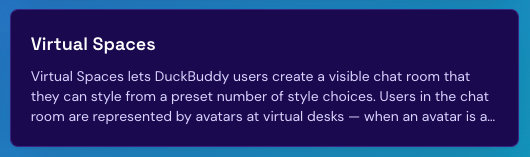
For context: DuckBuddy is an idea for a social networking platform for remote workers. The feature in question — Virtual Spaces — lets users create a visible chat room styled from preset themes (Cozy Loft, Tech Startup, Cabin in the Woods, Art Studio, Zen Garden). Each user in the room is represented by an avatar at a virtual desk. Avatar at the desk means the user is online and ready to chat. Empty room means nobody's there. It's a presence feature — you can see who's around before you start talking.
It's a big feature. It touches all the programming layers of DuckBuddy, the React frontend (room UI, avatar desks, style picker, chat panel), the Python/FastAPI service layer (room APIs, WebSocket server, presence tracking, chat delivery), and — because DuckBuddy is a social network with a polyglot data layer — all five databases: PostgreSQL for room configuration, Cassandra for high-volume chat history, Redis for real-time presence, Neo4j for room membership in the social graph, and MongoDB for flexible room preferences and analytics.
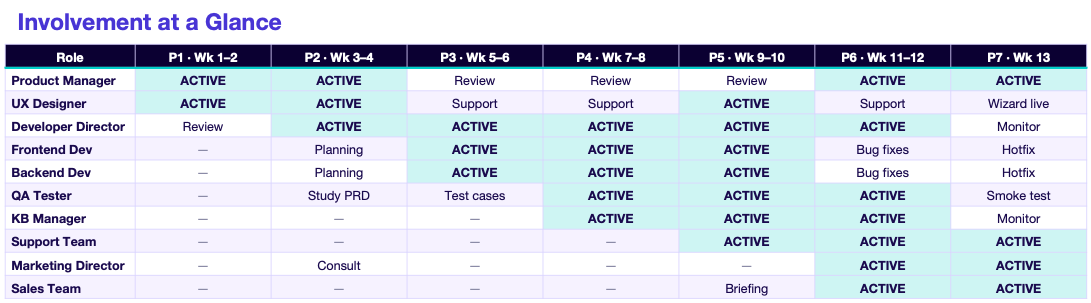
In theory, the release will run 13 weeks across 7 phases. And across those 7 phases, nine distinct roles will need to be involved in order to ensure a smooth roll out. Here's who, when, and why.
Who Does What, and When
Phase 1 (Weeks 1–2): Research & Define
Active: Product Manager, UX Designer
Reviewing: Developer Director
Not yet involved: Everyone else
The release starts with the product manager researching competitor features (Gather, Discord, Slack huddles), conducting user surveys and interviews to gauge interest, and writing the Product Requirements Document — the features, user stories, and acceptance criteria that everything downstream is measured against. The UX designer reviews the PRD, sketches the user flow, creates wireframes, and designs the preset style themes. The developer director does a preliminary feasibility review — identifying tech risks like WebSocket scaling and avatar rendering performance — and defines the technical architecture across all five databases.
Why this matters: the PRD is the contract. Every sprint review, every test case, every KB article, every sales talking point traces back to it. If the PM and UX get this wrong, everything downstream inherits the wrongness.
Phase 2 (Weeks 3–4): Design & Plan
Active: Product Manager, UX Designer, Developer Director, and the developers (planning)
Studying: QA Tester (studying the PRD)
Consulting: Marketing Director
The UX designer creates hi-fi mockups and an interactive Figma prototype. The dev director estimates the timeline (13 weeks), assigns developers, and creates Jira epics and sprint tasks. The frontend and backend developers review the designs and plan their component and service architecture. QA starts studying the PRD — not testing anything yet, but building the mental model of the feature they'll need to write the test plan. Marketing consults with the PM on positioning — what makes this feature unique versus competitors.
Why this matters: QA studying the PRD in week three — not week nine — is what makes their test cases sharp later. Marketing consulting in week four — not week twelve — is what makes the launch campaign aligned with what's actually being built. This is the phase where early involvement pays compound interest.
Phase 3 (Weeks 5–6): Build — Sprint 1
Active: Developers, Developer Director, QA (writing test cases)
Reviewing: Product Manager (sprint review)
Supporting: UX Designer (answering implementation questions)
The developers build. The frontend dev constructs the room shell, style picker, desk grid. The backend dev creates the schema changes across all five databases and builds the room CRUD API. QA writes detailed test cases — functional, edge cases, negative tests — and reviews them with the PM for completeness. The PM runs sprint reviews to verify the foundation work matches the PRD. The UX designer answers implementation questions as they come up.
Why this matters: QA writing test cases while the feature is being built — not after — means testing starts the moment the code is stable, not a week later. The PM's sprint reviews catch PRD drift before it compounds.
Phase 4 (Weeks 7–8): Build — Sprint 2
Active: Developers, QA (early functional testing), Knowledge Base Manager (starts), Sales (briefing)
Reviewing: Product Manager
This is where the cross-functional net widens. The developers continue building — WebSocket server, presence tracking, chat delivery. QA begins early functional testing on the dev build. The knowledge base manager starts — meeting with the PM and dev director to understand the feature, drafting the internal support doc outline and the customer-facing help article. Sales attends a feature briefing with the PM — learning what the feature is, the value props, the target customer profiles.
Why this matters: the KB manager starting in week seven — not week twelve — means the docs are drafted against the actual feature, reviewed with the UX designer for screenshot accuracy, and ready to publish before launch. Sales getting briefed in week eight means they have time to practice demos before go-live. Both of these are the difference between "prepared" and "fire-hosed."
Phase 5 (Weeks 9–10): Build — Sprint 3
Active: Developers, QA, Knowledge Base Manager, Support Team, Marketing Director
Reviewing: Product Manager
Now everyone is in the pool. The developers polish — the 5 preset themes, avatar animations, mobile responsiveness. QA tests WebSocket presence with multi-browser sessions, runs regression testing, and begins performance testing. The KB manager reviews docs on staging, taking screenshots of the actual built UI. Support attends a feature walkthrough with the dev director, completes troubleshooting training, and creates canned responses for common questions. Marketing creates assets — screenshots, GIFs of avatar animations, style previews — and drafts the blog post.
Why this matters: Support practicing on the staging environment in week ten — reproducing common issues, testing troubleshooting steps — means that when a customer says "I can't see avatars" in week thirteen, support has already seen it, already fixed it in staging, and already has a macro ready.
Phase 6 (Weeks 11–12): QA, Docs & Training
Active: QA, Knowledge Base Manager, Support, Marketing, Sales, Product Manager (UAT)
Bug fixes: Developers
Everything converges. QA runs the full functional suite, performance testing (500 concurrent WebSocket connections), cross-browser and mobile testing, max room occupancy tests, and UAT with the PM. The KB manager finalizes and publishes the internal support doc and external customer guide, and hands off to support. Support goes from training to readiness. Marketing coordinates the launch date and prepares the email campaign. Sales does live demos on staging and prepares pitch materials. The developers fix bugs and deploy to production.
Why this matters: this phase only works if the previous phases fed it. QA's full suite is ready because they wrote test cases in week five. KB docs are ready because they started drafting in week seven. Support is ready because they started training in week nine. Nobody is starting cold.
Phase 7 (Week 13): Launch
Active: Everyone. Sales, support, and marketing go live; QA runs post-launch smoke tests; the PM monitors metrics; the dev director monitors production stability; developers handle hotfixes.
The blog post publishes. The email campaign sends. Support answers customer questions. Sales pitches the feature to prospects. QA verifies rooms work in production. The PM monitors launch metrics and user feedback. Everyone monitors for issues — and everyone gathers feedback to feed into v2.
Timing Is Everything
Look at the pattern across those seven phases. It's not that everyone is involved in everything from day one — that would be chaos and take people away from their everyone tasks. It's that each role has a specific entry point where their involvement goes from "not yet" to "now," and those entry points are staggered deliberately:
- PM and UX start on day one — they define what's being built.
- Dev director and developers enter at planning — they determine how it's built.
- QA enters at study-then-write — they determine whether it's built right, and they need weeks of context before the first test run.
- KB manager enters mid-build — they need to understand the feature deeply enough to document it, but they need to start early enough to document the real thing, not a guess.
- Support enters before QA completes — they need to train on staging while it's still up, before launch pressure.
- Marketing enters mid-build for positioning, then activates fully for launch — they need weeks to build the campaign, not days.
- Sales enters at briefing, then demos, then go-live — they need time to practice pitching a feature they just learned exists.
If you pull any of those entry points too late, you get the fire drill: support fire-hosed on release day, marketing scrambling, KB docs that describe last month's version, sales blindsided by customer questions. If you pull them too early, you waste people's time on a feature that might change under them.
The right timing isn't a matter of intuition. It's a matter of process — written down, visible, and repeatable.
The Tool: Swim Lanes and Gantt Charts
So how do you make that process visible? You amp it out!
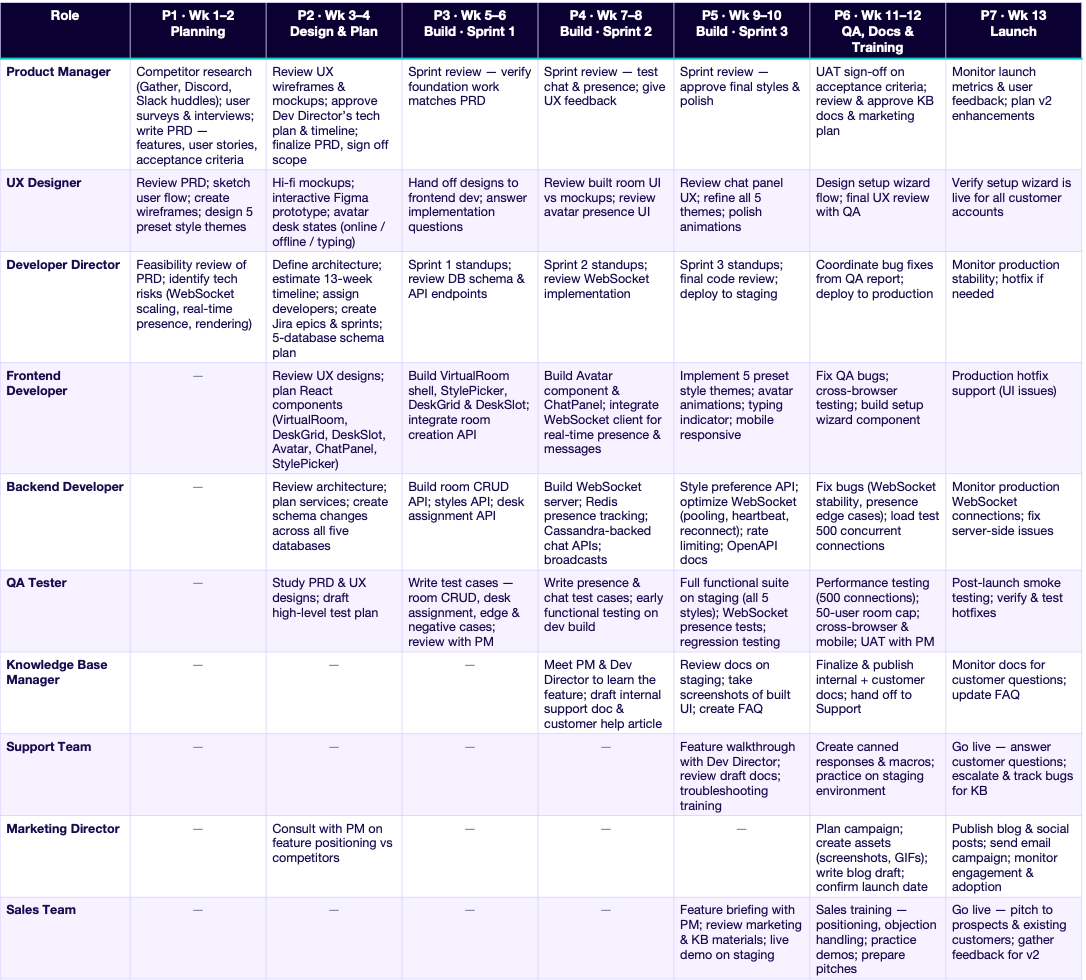
A swim lane chart — or a Gantt chart — is the perfect way for everyone to see what needs to be done, by who, and when. The roles go down the left axis. The phases go across the top. Each cell shows the tasks that role owns in that phase. In one glance, any person in the company can answer three questions: What am I supposed to be doing right now? Who else is working right now? When does my work feed into someone else's?
That's exactly how the DuckBuddy Virtual Spaces guide is structured — nine roles down the side, seven phases across the top, and inside each cell the specific numbered tasks: PM-1 through PM-13, UX-1 through UX-16, QA-1 through QA-16, and so on. There's no ambiguity about who owns what. There's no "I thought you were handling that." The chart is the accountability.
And there's a second view that's just as valuable: the involvement timeline summary. For each role, across each phase, it shows one of four states — Active (primary work happening), Review (reviewing deliverables), Planning/Study (preparing), or — (not yet involved). That single grid answers the most important logistical question in any release: who needs to be in the room, and when? It tells you who to invite to which meetings, who needs to be on standups, and who can safely ignore the whole thing until their phase begins.
The Upgrade: Interactive Swim Lanes with AI
Here's where it gets better. A swim lane in a static document — a PDF, a slide, a printed chart on a wall — is a snapshot. It shows the plan. It doesn't show the progress.
These days, you can use AI-powered interactive site builders like Lovable to make your company swim lane interactive. You describe what you want — a page showing your release phases, roles, and tasks, where each task can be marked complete, where each department can see its own lane — and the AI builds it for you. No design skills needed. No development sprint required. You describe, it builds, you refine, you share the link.
That's what I did for DuckBuddy for the Virtual Spaces release. Instead of a static chart, I built an interactive page where:
- Each phase of the feature release is laid out across the swim lane, visible to every team.
- Each department or team can see who has completed what tasks in each phase — in real time.
- Task states update as work gets done, so the chart stops being a plan and becomes a live status board.
- Anyone — the PM, the dev director, support, sales — can open the page and immediately see where the release stands, what's finished, what's blocked, and what's coming next.
- Each phase has a meeting with recorded meeting notes so we know the progress, roadblocks, and next steps etc.
The difference between a static swim lane and an interactive one is the difference between a map and a GPS. The map shows you the route. The GPS shows you the route and where every car is on it, right now. When the KB manager can see that QA has finished its full functional suite, they know their docs need to be final now. When the PM can see that support training is complete, they know launch readiness is real. Nobody has to ask "where are we?" The page answers it.
And because tools like Lovable let you build this by describing it, the barrier to creating one is nearly zero. You don't need a developer to build your release dashboard. You need ten minutes and a clear description of your phases and roles.
Check it out at this link, continue with View Only Access, and click on Virtual Spaces to see the example!
Regular Update Meetings
A swim lane tells you who does what when. But a big feature release also needs meetings — specifically, a meeting at the end of each major phase.
These aren't status meetings for their own sake. They serve three purposes:
- Track progress. Is the phase actually done? Are the tasks in the lane marked complete — and is that true? The phase-end meeting is where the work gets verified against the plan, not just reported.
- Create space for questions. If the KB manager has questions about how a feature behaves in an edge case, the phase-end meeting is the room where they can ask the developer directly. If sales doesn't understand a value proposition, this is where the PM clarifies it. Questions asked at phase boundaries are cheap. Questions asked on launch day are expensive.
- Surface roadblocks early. If QA's performance testing is behind, or the WebSocket server has a stability issue, or marketing is waiting on screenshots that don't exist yet — the phase-end meeting is where that gets said out loud, to everyone, while there's still time to react.
For the Virtual Spaces release, that means seven checkpoint meetings across 13 weeks — one at the end of each phase, with the right people in the room for that phase. Not everyone attends every meeting. The involvement timeline tells you who needs to in each meeting depending on which phase and who is involved.
Not Every Feature Needs the Full Machine
Let me be clear about proportionality. A giant, all-department, 13-week swim lane with seven phase-end meetings is for big feature releases — new capabilities that change how customers use the platform, that touch multiple systems, that carry go-to-market weight.
Not every feature needs that. A bug fix doesn't need a marketing campaign. A small settings toggle doesn't need a sales briefing. If you force the full machine onto every small change, the process becomes overhead that people route around — and then you've lost them for the big releases too.
But here's the principle that applies at every size: knowing who needs to know what, and when, is a process that needs to be recorded regardless of the size of the release.
For a big feature, that record is a full swim lane with phases and meetings. For a medium feature, it might be a lighter checklist: dev → QA → KB review → support note → in-app changelog. For a small fix, it might be two lines: "Support needs a heads-up before deploy; KB article #142 needs a one-line edit." The size of the process scales. The existence of the process doesn't. Because the underlying question never changes — who needs to know what, and when — and the answer should never depend on one person's memory.
Write it down. Scale it to fit. But record it.
Bottom Line
In principle and in practical reality, a feature release isn't a development event. It's a company event. The developer's code is one instrument in an ensemble — and the music only works if every instrument comes in at the right time.
The product manager defines what's being built and why. The UX designer shapes how it feels. The dev director and developers make it real. QA verifies it's right. The KB manager captures how it works in words and screenshots. Support learns to troubleshoot it before customers hit problems. Marketing tells the story. Sales turns it into revenue. Nine roles, seven phases, thirteen weeks — and a specific, staggered entry point for each one, timed so that every team's work is ready exactly when the next team needs it.
No team owns a feature release. But every team owns a lane in it — and when the lanes are drawn, visible, and live, the whole company can see the relay they're running together.
The feature starts with a requirement. It ends with a customer who knows how to use it, a support team ready to help them, a KB that answers their questions, a market that knows it exists, and a sales team that can pitch it.
Everything between those two points is a team process. Draw the lanes. Assign the tasks. Record the timing. Record and track the progress together so when launch day comes, everyone is ready to go!