How You Can Agentic AI to Build What You Need Now
Even today, millions of people logging into online products and can still run into the same three walls they always have:
- The functionality just isn't there. You need a view, a report, an alert, or a workflow that the product simply doesn't offer. It's not hidden behind a paywall or buried in a settings menu. It doesn't exist.
- The feature request is stuck in limbo. You submitted it months ago. It got some upvotes. A product manager marked it "under consideration." And there it sits — along with hundreds of others — in a backlog that moves at the speed of a glacier. You've come to accept that it may never be accepted.
- There are too many screens. The information you need does exist in the product — but it's scattered across five dashboards, three filter views, and a sidebar you have to expand and collapse twelve times just to see one simple thing. The data is there. The picture isn't.
For years, the response to all three of these walls was the same: wait. Wait for the next release. Wait for the roadmap to swing your way. Wait for someone else to prioritize your problem. Or build a fragile spreadsheet on the side that you manually update every morning until you stop updating it and go back to suffering.
That wait is over!
Agentic AI changes the equation entirely. When you have an agent — with proper access to your tools and data, guided by a well-structured prompt — you can build what you need yourself. Not by submitting a ticket and hoping. Not by learning to code a full application from scratch. By telling an agent what you want, giving it the access it needs to read your data, and letting it construct a solution that works for you — today.
This isn't science fiction. It's not a future roadmap item. People are doing it right now, across different platforms, different agents, and different use cases. Let me show you three real examples.
The Core Idea: Anyone Can Fill the Gaps
By using AI, we're not replacing the products that you use at work. I still use HubSpot, Jira, Gmail, etc at work. You don't need to rebuild what is out there or replace what you are using, at least not completely. However, AI can help fill in the gaps between what you know and don't know and what your products can do.
And there are two flavors of gap-filling:
- Agents that connect to your data. Tools like Claude and OpenCode can connect to the data your platforms expose — through APIs, integrations, or authenticated access — pull exactly what you care about, and present it back to you in the shape you want. A custom dashboard. An alert. A consolidated report. A single view that replaces ten clicks.
- App builders that construct new tools from scratch. Tools like Lovable take a plain-English description of an app and build it — a working website, an interactive dashboard, a little tool that didn't exist anywhere before. No data connection required; just an idea, described clearly.
The prerequisites are always the same:
- Proper access. If the agent needs your data, it needs permission to read it — an API key, an authenticated session, a secure integration. Never your password pasted into a chat box.
- A clear prompt. The agent is powerful, but it's not psychic. The difference between a vague prompt and a precise one is the difference between a broken prototype and a tool you use every day.
- Security boundaries. You decide what the agent can see, when it can act, and where the output goes.
With those three things in place, the gap between "I need a tool that does X" and "I have a tool that does X" collapses from quarters to minutes.
Let's see it in action.
Example 1: An Integration Adoption Dashboard — Built with Claude at Work
The Problem
At my company, customers can enable different integrations — some have one, some have several. A question that matters to every team — support, sales, product, development — is: who is actually using which integration?
And not just a total. The real question has angles: Which integrations are popular? What kind of customer uses them — what company size, what subscription level, what module type? And the follow-up that follows the data around: which customers are most likely to add a given integration to their subscription next?
The data exists — customer accounts, subscription levels, module types, integration usage. But no report in any of our systems combines those angles. Answering "which customers, at what size and subscription level, have which integration" meant pulling exports from separate screens and hand-building a spreadsheet that was stale the moment it was finished.
And there was a second, harder problem hiding behind the first: is an integration worth what it costs us? Development spends real time fixing integration bugs — that time is tracked in bug pulses, but nobody ever puts it next to the profit the integration brings in. So the big decisions — which integrations to keep, fix, promote, or retire — were being made on gut feel.
The Solution
I used Claude — with access to our customer data and our bug tracker — to build the dashboard and report myself.
Here's the prompt I used:
Prompt:
Build me a dashboard and report showing how many customers are using each integration at my company. Here's what I need:
Data sources: Pull our customer account data — company name, company size, subscription level, and module types. Pull integration usage — which customers have which integrations enabled. Pull the integration bug pulses from our bug tracker, including the time development spent on each. Credentials come from the environment — never hardcoded.
The dashboard: A single page. For each integration:Total customers using itBreakdowns by company size, by subscription level, and by module type — every angle of who uses itFilters so I can slice the entire dashboard by any combination of those
The "most likely to add" view: For each integration, the customer profile where adoption is highest — the company size, subscription level, and module type of the customers most likely to add it to their subscription. That's our best target for the next sales conversation.
The value view: For each integration, compare the profit it adds to the company against the development time spent fixing its bug pulses — a simple side-by-side comparison per integration, so the cost of maintaining it sits right next to what it earns.
The report: A summary section I can hand to my team: which integrations are popular, the customer profile most likely to add each one, and which integrations cost more in development time than they return in profit.
A Refresh button that re-pulls everything, and a "last updated" timestamp at the top. Keep it simple — one HTML file, minimal CSS, no frameworks.
What Claude Did
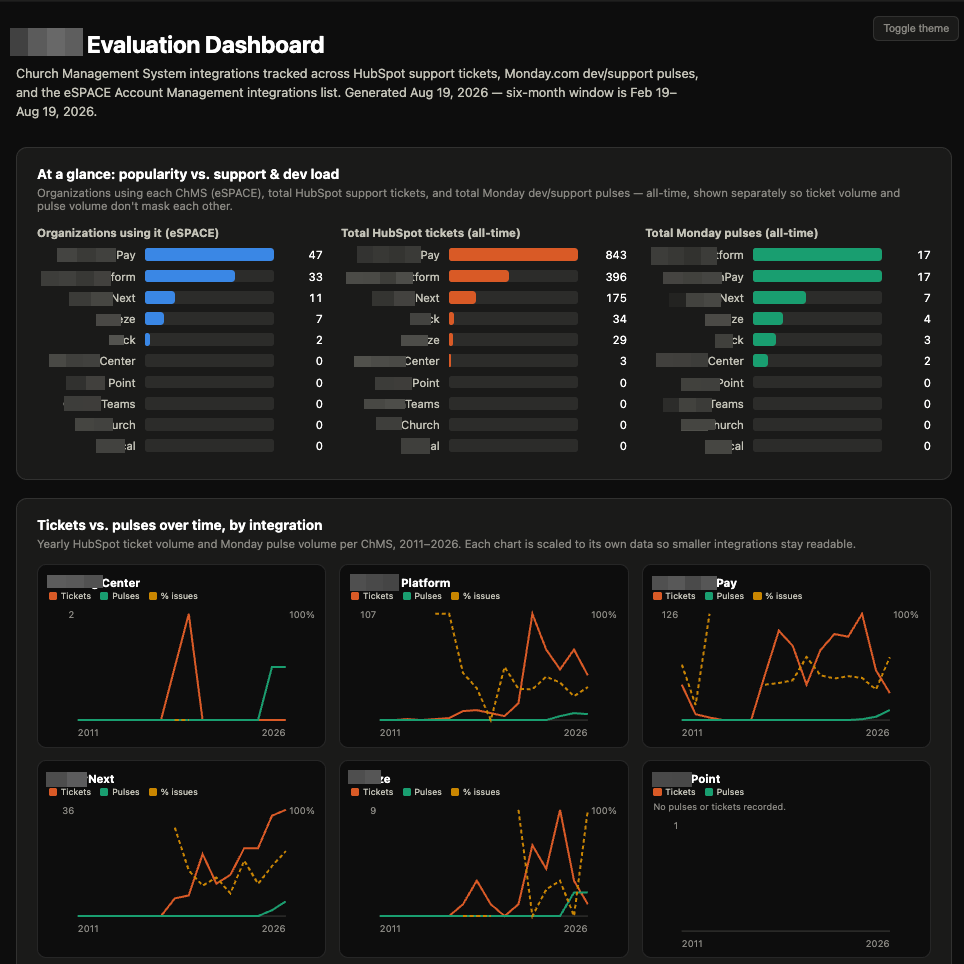
Claude pulled the customer accounts and the integration usage, joined them, and built the dashboard: per-integration customer totals, then the breakdowns — company size, subscription level, module type — all filterable from the same page. It built the "most likely to add" profile by finding where each integration's adoption concentrated. Then it pulled the integration bug pulses, summed the development time per integration, and set that beside each integration's profit contribution in a simple side-by-side view.
The Result
One screen now gives me all the data and all the angles of the data I needed: which customers — at what size, what subscription level, and what module type — have which integration. My team can see at a glance which integrations are popular, and the customer profile most likely to add each one to their subscription.
And the value view changed the conversation. When a week of development time goes to fixing bug pulses on an integration used by a handful of customers at the lowest subscription level, that's visible now — sitting right next to the integrations that quietly earn their keep. We're making better decisions — which integrations to maintain, which to promote, which to retire — based on data instead of gut feel.
Example 2: An Integration Request Tracker — Built with Claude at Work
The Problem
At work, I regularly request things from integration companies on behalf of customers. Those requests live in my email inbox — threads sent back and forth between me and each integration company. The customer context lives in HubSpot, in tickets.
That split creates questions I can never answer quickly:
- When did I request that thing from integration company X, on behalf of this customer?
- Which HubSpot ticket does that request belong to?
- For a particular integration company — how many of my requests were for new integrations versus upgrades to existing ones?
Answering any of these meant manual archaeology: search the inbox by company name, open thread after thread, find the dates, note the customer, then switch to HubSpot and hunt for the matching ticket. Then do it again for the next thread. Then count and classify new-versus-upgrade by hand. An afternoon, gone, every time.
HubSpot can't see my inbox. My inbox can't see HubSpot. No platform on earth connects those two things the way I needed them connected.
The Solution
I used Claude — with access to my email and HubSpot — to build me the dashboard myself.
Here's the prompt I used:
Prompt:
Build me a dashboard that tracks every request I've made to integration companies, by connecting my email and HubSpot. Here's what I need:
Data sources: Connect to my work inbox via the mail API (credentials provided securely through the environment — never hardcoded). Connect to HubSpot via its API using my access token, also from the environment.
What to pull:Every email thread sent back and forth between me and the integration companies in my inbox — both directions, with dates and senders.Every ticket in my HubSpot account that involves an integration company or an integration request, with ticket ID, customer, status, and dates.
Matching: For each email thread, match it to the HubSpot ticket it belongs to — matching on the integration company, the customer, and the dates. The goal: for any request I made to an integration company on behalf of a customer, I can instantly see which customer ticket that request goes with.
Dashboard layout: A single page.A timeline view: every integration request in chronological order, showing the integration company, the date of my request, the customer it was on behalf of, and the linked HubSpot ticket (as a clickable link).A stats section: for each integration company, a count of requests split into new integrations versus upgrades — so I can see at a glance, for one company, how many of my asks were brand-new integrations and how many were upgrades to existing ones.A filter by integration company and by new-versus-upgrade.
Behavior: A Refresh button that re-pulls everything. A "last updated" timestamp at the top. Read the ticket statuses live from HubSpot so I can see which requests are still open.
Keep it simple. One HTML file, minimal CSS, no frameworks.
What Claude Did
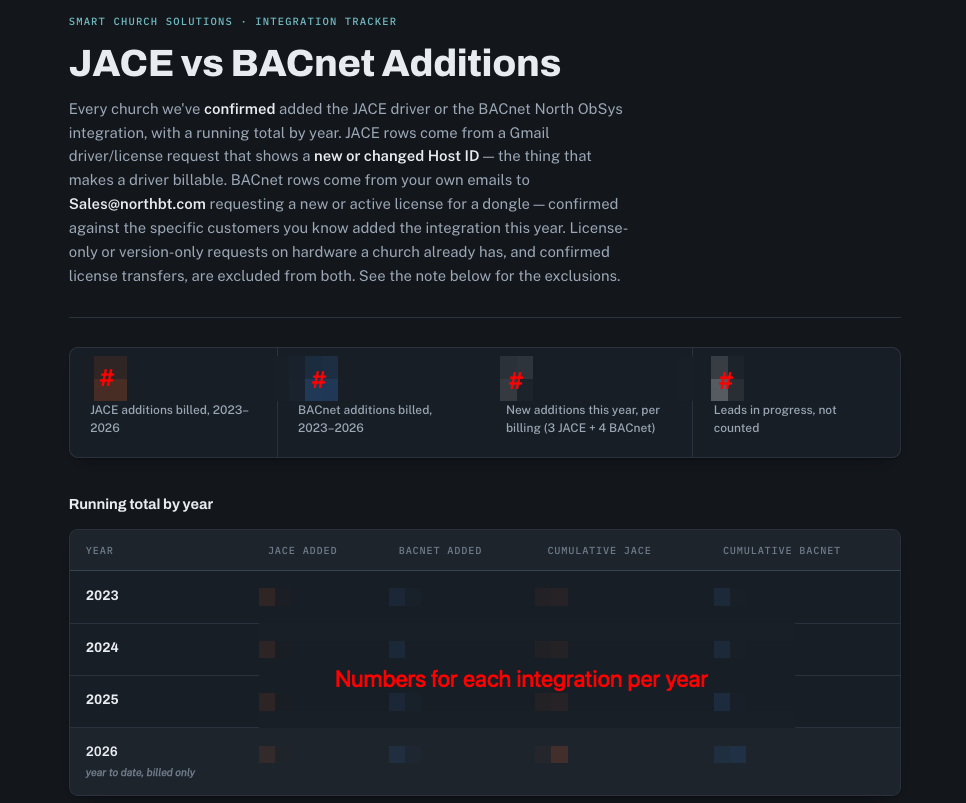
Claude pulled the integration email threads from the inbox and the relevant tickets from HubSpot, then did the part no tool had ever done for me: it matched them — correlating each thread to its customer ticket by company, customer, and dates. It classified each request as a new integration or an upgrade (using keywords and thread subjects, with an "unclassified" bucket I could correct by hand), then generated a clean single-page dashboard with the chronological timeline, the clickable HubSpot links, and the per-company new-versus-upgrade stats.
The Result
One screen now answers every question that used to cost an afternoon. When did I request that from company X, and for which customer? It's on the timeline, linked to the exact ticket. How many of my requests to company X were new integrations versus upgrades? It's a number on the stats panel, filterable, always current.
The gap — the one between "my inbox has half the data and HubSpot has the other half" — is filled. And I'm not waiting on anyone to ship it.
The Second Solution
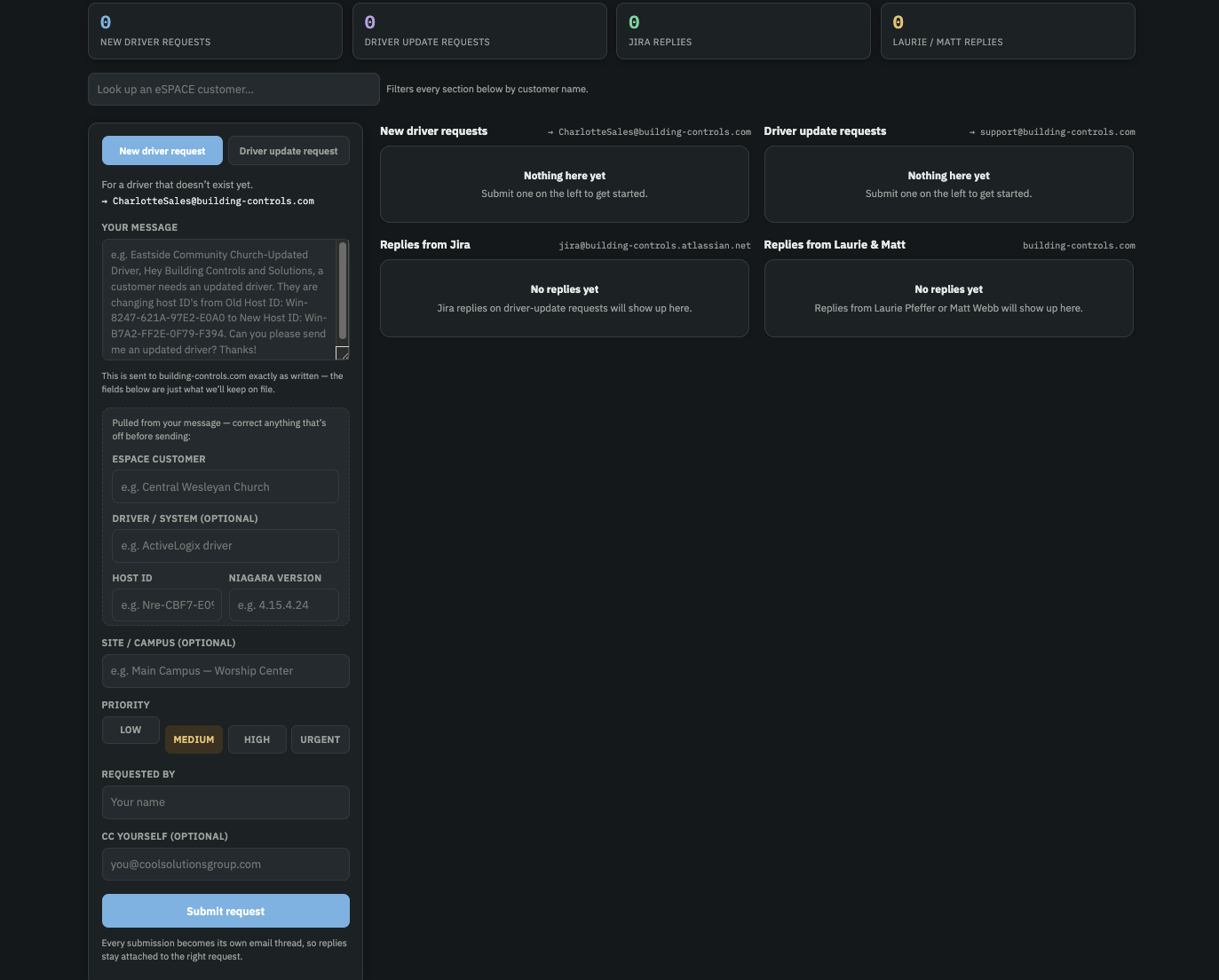
I had Claude create a from that I can fill out that emails the right integration company and then tracks the requests between different integration companies a and also tracks the requests for one particular company to see if they are for new integration drivers versus updated ones.
Example 3: Simulating an Entire Development Project — Built with OpenCode
The Problem
I learn best by seeing how something is built and one of my main interest is development cycles. I love being a part of and learning about the way real development teams build things through platforms like Jira, with epics, stories, issues, sprints, or Kanban boards. I could read articles about how Jira and development cycles work in various ways. But reading isn't seeing. Webinars are good, but they aren't hands on. Dev courses break things up into such small parts, that it's hard to see the full picture and how everything goes together.
When I was trying to solve this problem, what I wanted was to watch a full project get planned the way a real team would plan it — every layer of the tech stack, every main feature, broken down, sequenced, and organized.
No tool does that for you. This type of thing requires hands on learning. The only way to see a process like this is to run it.
The Solution
I used my personal OpenCode agent — an agentic CLI tool that can write and organize files, work with structured data, and build things in my terminal — to run build the whole development process for building DuckBuddy.
Here's the first prompt I used:
Prompt:
I want you to build out a complete development project plan for DuckBuddy.net — my idea for an online software social networking app. The teck stack is JavaScript REACT, Python, Fast API's, PostgreSQL, MongoDB, Redis, Neoj4, and Cassandra. The goal is for me to see exactly how a development team would plan and build this, specifically the way they'd do it in Jira.
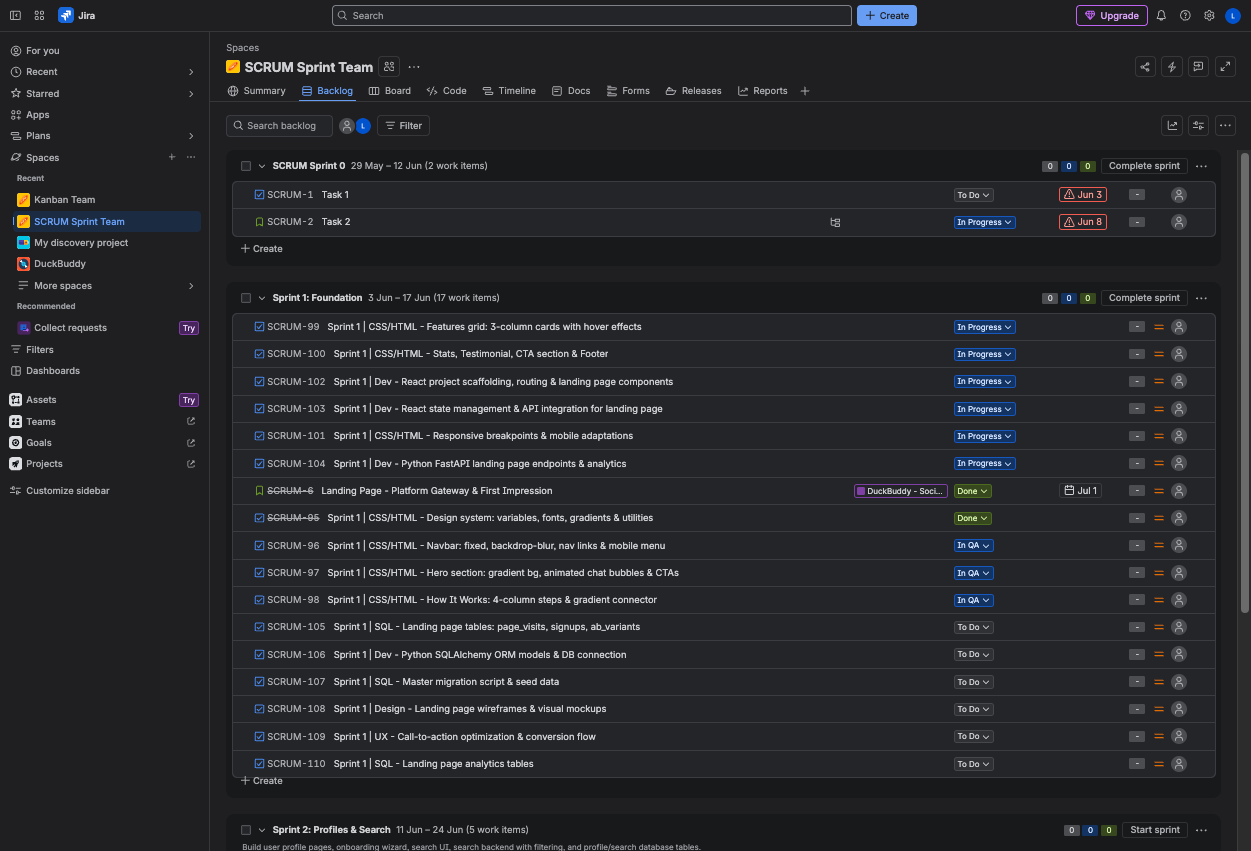
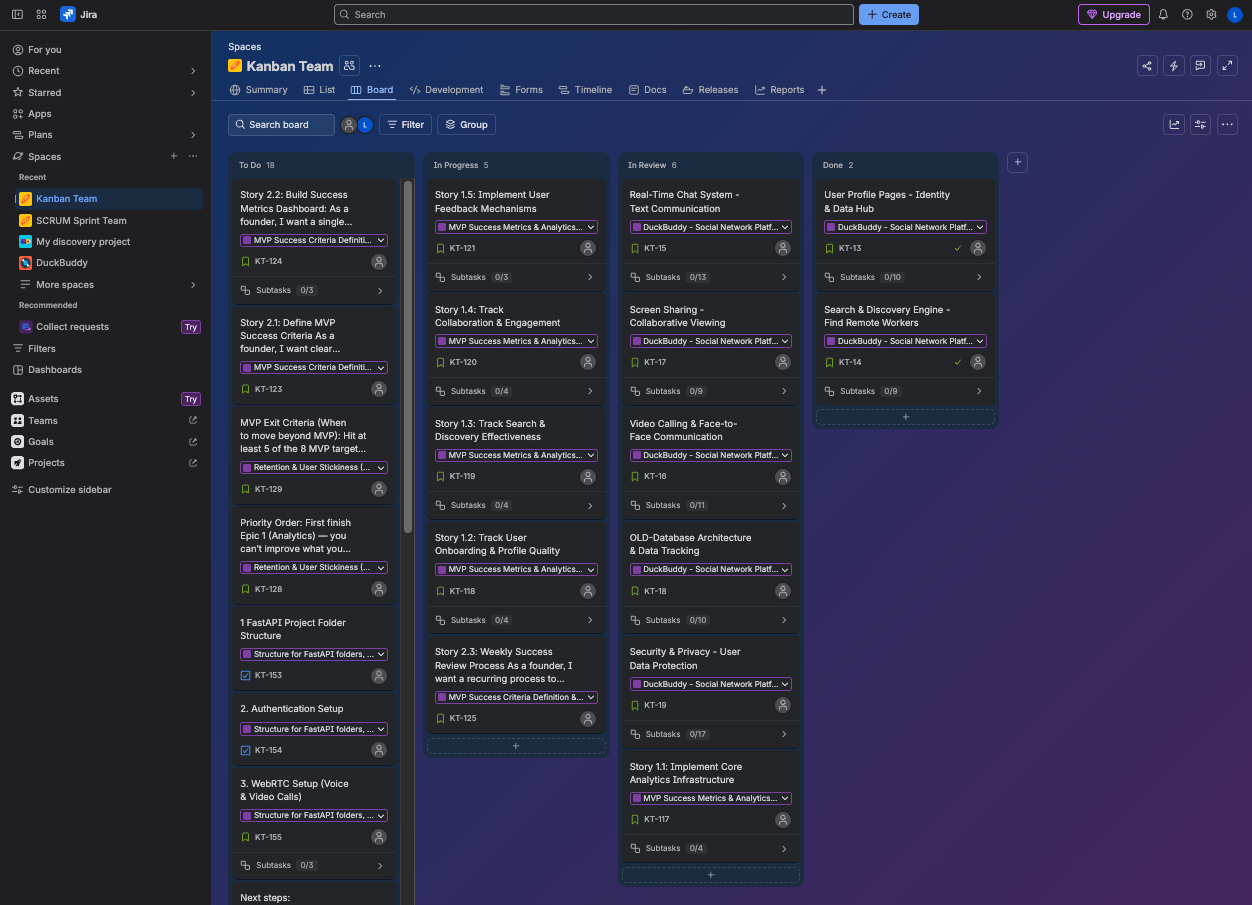
What to create:Epics for every major layer and feature of the app: user accounts and authentication, profiles, the social graph (following/followers), the feed, posts and interactions, search, notifications, settings, admin, and the infrastructure/deployment work.Under each epic, stories — the user-facing pieces of work — and issues — the specific technical tasks it takes to deliver each story.Organize everything into sprints — a realistic sequence of what a team would build in what order, and why.Lay it all out on a Kanban board as well for comparison— epics, stories, and issues organized by status where I can move items to the different phases of the Kanban board and see the whole project the way a team sees it in Jira.
Be thorough. I want every main feature of DuckBuddy.net accounted for such as......, and every tech stack layer it would take to build it.
What OpenCode Did — and Then Did Again
OpenCode built the whole thing: epics for each layer and feature of the app, stories and issues broken out under each, sprints sequenced in a build order, and a Kanban board organized by sprint and status. For the first time, I could look at DuckBuddy.net the way a development team would — every layer, every feature, everything it takes.
But the interesting part came next. I prompted OpenCode to do an analysis of the total project — to look across all the epics, stories, and sprints and find the programming gaps. What was missing? What had no owner, no story, no epic?
It found real gaps: an account recovery flow with no issues under it, notifications with no epic at all, no email verification, no error handling strategy, no deployment story for the final sprints. It made suggestions for each one.
Then I prompted it to fill in the gaps — write the missing stories and issues — and reorganize the sprints so the order in which things were built was more realistic: foundational layers first, dependent features later, infrastructure work where it actually belongs in the sequence, not bolted onto the end.
The Result
I watched a development project get planned, audited, and re-planned — which is exactly what real teams do. Plan. Review. Find the gaps. Fill them. Re-sequence. Plan again.
And because I'd seen it twice in a hands on way, I understood the full process in a way no article could teach me: how a team would use Jira to build each tech stack layer of DuckBuddy.net, every main feature in order, and why the order matters as much as the work itself.
That's the quiet superpower of agents: they don't just build the thing. They show you how the thing gets built, evaluate what needs to change to make it better, and then has the power to make those changes all just by you chatting with it!
Bottom Line
The pattern across all three examples is the same, even though the tools and the use cases are completely different.
In each case, there was a gap between what existing platforms offered and what I actually needed. No tool explains what a feature request touches. No tool connects the inbox to HubSpot the way I needed. No tool lets you watch a development team plan and build a product. None of those gaps were going to be filled by a feature request — not on any timeline that helps you.
Agentic AI fills them. Lovable built a standalone learning app from a description. Claude connected two platforms that don't talk to each other and gave me the view and tracking that neither of them offers. OpenCode simulated an entire development process so I could understand it from the inside. Three different tools, three different strengths — custom dashboards, custom reports, alerts, learning apps, interactive websites — all built by a person who is not a developer, from plain-English prompts.
As much as companies try, no product can provide literally everything that each customers wants or needs. But with AI, everyone has the power to create what they need and customise what they create to be what they truly need as well!
It's not a question of whether an agent can build what you need. It can. Instead, it's a prompt, "Hey agent build me X that does X and connects to X to get X data and then alerts me based on X!"