How I Got my Agent to Speed Up my Troubleshooting Process

Most of us know how agents can speed up our work, be connected to multiple platforms to perform multiple tasks at one time, and greatly reduce the time that is tasks to perform almost any analytical task. The real distinguishing factor is knowing what agentic platform, what model, and what prompt to use in a secure way. That combination is what turns a general-purpose AI assistant into a tool that genuinely changes how you work.
The Reality of Troubleshooting
When you're troubleshooting something, there is never just one key thing to look at. There's no red flag waving in the wind, nothing that jumps out and says, "Hey, here is the issue." When things break, the fact that they broke and the reason they broke is often not obvious — and the more complex the mechanical system or software is, the harder it is to troubleshoot.
Whether it is mechanical or software related, most troubleshooting involves tracking through each setup step from start to finish. This takes a lot of time. It's the one thing that the people reporting the issue don't want you to spend, and it's the one thing that the person doing the troubleshooting is pressured to use the least of. You're caught between the demand for speed and the reality that speed requires understanding, and understanding requires time.
Systems Aren't Built for Troubleshooting — But They Could Be
Most systems aren't designed for a great and easy troubleshooting experience. However, they can be. Planes can be created with the mechanical engineer in mind, and software can be designed so that the data and metrics are right there to make for a quick and efficient troubleshooting experience. But if systems are not built that way from the start, it's hard to veer in that direction later.
Most software companies want to keep moving forward — building new things, releasing new features, pushing the product ahead. "Backend" improvements that the customer doesn't see are often lower on the priority list. That means the tools and views that would make troubleshooting faster and easier tend to stay on the wishlist, year after year. The people who need them most — the support teams on the front lines — are left to cobble together their own processes across whatever screens and logs are available.
Enter Agentic AI
However, in the world of agentic AI, there's got to be a way to solve this. Most people using it seem to think it can solve everything, and that's just about true. Especially when companies like Lovable make building software, webpages, and basic products so easy — even for non-techy people. The gap between "I need a tool to do X" and "I have a tool that does X" has never been smaller.
The main issue a support person can face when troubleshooting is the burden of having to look at multiple screens and data points just to understand if one item truly broke or how it's behaving. You're toggling between tabs, refreshing logs, cross-referencing timestamps, and trying to hold it all in your head at once. When support has to look at an integration between two different softwares, the complexity rises even more. Different softwares are written in different languages, have different structures, and use different ways of labeling things. What one system calls a "transaction ID" might be an "event reference" in another. What one logs as a timestamp in UTC, another might display in local time. Every difference is a small hurdle, and they add up fast.
My Setup and My Goal
I recently got access and permission to use an agent for work (Woohoo)! My number one goal in using this agent is to troubleshoot more effectively and faster specifically for integrations. Again, what you can do and what you should do with an agent really depends on the platform, the model, and the prompt that you give it.
The platform and model that I get to use at work is Claude with Claude's Chrome extension tools. This is extremely important, because when I troubleshoot integrations, I often have to look at multiple pages within the software I support — and when testing an integration with a third-party's demo account, I have to obviously look at those screens as well, which just increases the number of views I need to hold in my head at once.
Timing is also everything for integrations. When did system A send the API call? What API call was it? When did it send it? What was the response back? If you miss it because your job requires you to multitask in ways that make it impossible to keep up with all the screens needed to troubleshoot the integration, then you have to try again — and maybe again, and maybe again. Each integration has a lot of data points that you have to verify and retrys cost time that you don't have.
Then, once you get the right test, capture the correct data, and verify the true results, you still have to write up a quick report on it. The cycle of set up, execute, observe, verify, and document is repetitive, manual, and ripe for exactly the kind of help an agent can provide.
The Dashboard Prompt
In the world of agentic AI, there is an easier way.
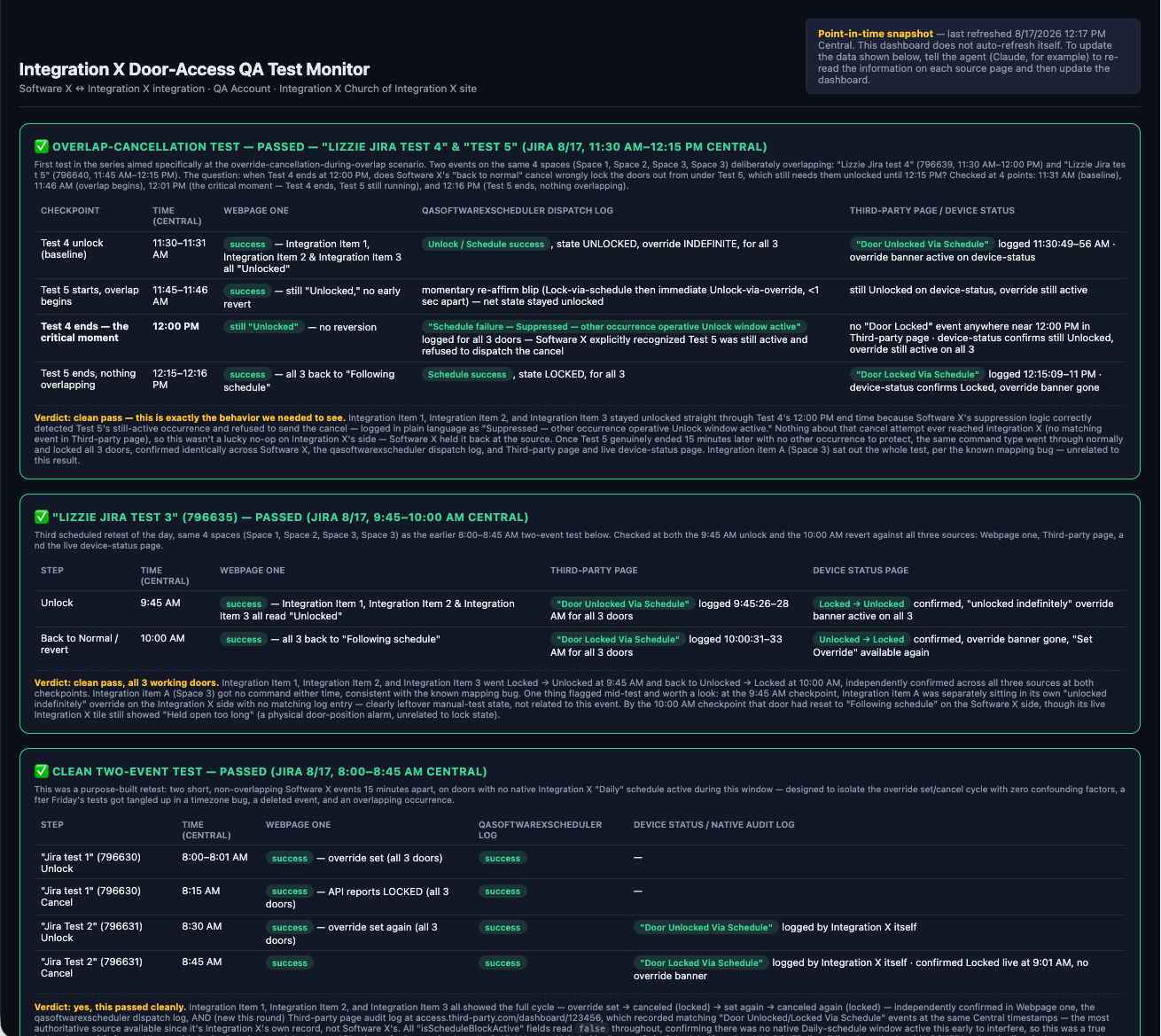
Since I get to use a platform and model that can see what I'm logged into in my browser without having to give it my login information, and since it can read information across multiple browser windows and compile information quickly, I prompted it to create a dashboard for me. The dashboard would show me, in one view, the status of each data point on each screen that I needed to look at:
- What did Software A's API call log say, and when?
- What did the API call log on Service 2 say, and when?
- What did the third-party software say, and when?
Instead of alt-tabbing between five different windows, refreshing each one, and mentally stitching together a timeline across systems that don't agree on how to label anything, I had a single view. One place. The full picture.
The Secure Pull — and Why It Matters
Now, since agents are created to securely access information, I know that it could not log in using my credentials to read all the information on all these pages on its own. But it could read the tabs that I was already logged into and be prompted or scheduled to "pull" the info from those open webpages and update the dashboard on a recurring basis.
This is an important function of an agent, and it's worth pausing on. The agent doesn't need to own your credentials (and shouldn't for security reasons). It doesn't need persistent access to your accounts. It can operates within the session you've already authenticated into, reads what you've authorized it to see, and compiles it for you. The ability to schedule or trigger a pull means you can set it to capture data at the right moment — when that API call fires — without having to be staring at the screen at exactly the right second. You're no longer racing the clock. The agent is watching for you, on your terms, within boundaries you control.
This matters because it preserves security while still delivering the speed and consolidation that makes troubleshooting bearable. You're not pasting passwords into a chat box. You're not giving an AI standing access to production systems. You're saying, "I'm already logged in. Look at what I see, pull it together, and show me the story." That's a fundamentally different and safer model than handing over the keys, made possible by the browser extension that the module uses.
The Result
I'm able to troubleshoot significantly faster now. What used to be a multi-window, multi-retry, 45 min -multi-hour process of hunting through logs and cross-referencing timestamps has become a single-view exercise. I create the test in one platform, tell my agent about it and while I working on other tasks, the agent pulls the data from each system, and updates the dashboard to show me what happened and when. I can see in seconds whether the API call left Software A at the correct time or not, whether Service 2 received it when it was supposed to, and what the third party did with it and any follow up API calls for the same test. I can keep all the browsers windows open to all the softwares, add new tests (or ask my agent to do so depending on the complexity) and then have my agent track it all.
I also get a quick summary of the results from my agent that I can put as the update on the ticket that concisely explains how the test went and why it did or did not work. I can prompt my agent to have it formatted the same way so every update is the similar ad easy to read and understand across multiple tests.
For QA testing, I also copy and paste the next test, it's rules and parameters and desired results from the ticket, into ym agent and basically tell it to "go". QA testing has never been so fast, just copy what the one agent wrote as the QA tests into my agent and it thinks, analyses, and then writes up the summary needed to post back to the ticket! This is especially important becasue the more output someone else produces with their agent, the more you will need to in order to stay in the game.
In the End
I hope that one day my suggestions on how to improve the platform for support will make it into the software natively. A built-in integration troubleshooting view — one that pulls logs, timestamps, and statuses across systems into a single pane — would be a game-changer for every support engineer who works on integrations. But I'm not holding my breath, and I don't have to.
This is a great example of how you can use an agent to give you functionality that you need now. Because of agents and what they can do, we don't always have to wait for the next software update or for our feature request to be accepted. Agents expand what a platform can do — you just have to find the right agent to use, in the right platform, with the right prompts, while still using it in a secure way.
The tools to work faster are already here. The question is whether you're using them.